# Planning {#sec-planning}
This chapter summarises one approach to planning a study.
For a good summary of various approaches to sample size planning, see this paper by Daniel Lakens [@lakensSampleSizeJustification2022].
Here is a table from the paper (@tbl-lakens-justification).
```{r}
#| label: tbl-lakens-justification
#| tbl-cap: "Types of justification for sample size decisions, and when each
#| applies. Adapted from Lakens (2022)."
#| code-fold: true
library(kableExtra)

lakens_table <- tibble::tibble(
  `Type of Justification` = c(
    "Measure entire population",
    "Resource constraints",
    "Accuracy",
    "A-priori power analysis",
    "Heuristics",
    "No justification"
  ),
  `When is this justification applicable?` = c(
    "A researcher can specify the entire population, it is finite, and it is possible to measure (almost) every entity in the population.",
    "Limited resources are the primary reason for the choice of the sample size a researcher can collect.",
    "The research question focusses on the size of a parameter, and a researcher collects sufficient data to have an estimate with a desired level of accuracy.",
    "The research question has the aim to test whether certain effect sizes can be statistically rejected with a desired statistical power.",
    "A researcher decides upon the sample size based on a heuristic, general rule or norm that is described in the literature, or communicated orally.",
    "A researcher has no reason to choose a specific sample size, or does not have a clearly specified inferential goal and wants to communicate this honestly."
  )
)

lakens_table |>
  knitr::kable(align = "ll") |>
  kableExtra::kable_styling(
    bootstrap_options = c("striped", "hover"),
    full_width = TRUE
  ) |>
  kableExtra::column_spec(1, bold = TRUE, width = "25%") |>
  kableExtra::column_spec(2, width = "75%")
```
Based on my conversations with various people in the learning and instruction lab, as well as many folks in other psychology and human neuroscience labs, there is a discrepancy between how people say they plan studies (or how they would like to plan studies) and how they plan studies in practice.
Most people try to concoct an *a-prior* power analysis, since that seems to be deemed more acceptable in mainstream journals and general discourse.
But scratch beneath the surface and the most common approach *in practice* is the "resource constraints" approach.
This is not a criticism, it is simply an observation.
The resource constraints approach targets the maximum reasonable sample size possible based on the resources available.
This resource-based approach lends itself to planning via determining the minimal statistically detectable effect, or a sensitivity power analysis (rather than an *a-priori* power analysis; see @tbl-lakens-evaluation).
Using resource constraints to determine effect size sensitivity would be a lot simpler than the simulation-based approaches outlined below, as it determines the size of an effect that one could detect with a specified research design and level of statistical power.
So, before you get lost digging into the weeds below, I would strongly suggest that you have a conversation with your research group about implications of a resource constraints approach within the context of your project.
A resource constraints approach will save you a lot of time, and in the majority of cases it will more straightforwardly embody how your sample size is being set in practice.
And for reasonably simple designs and analyses that avoid more complex, multi-level modelling approaches, then a tool like [G*Power](https://www.psychologie.hhu.de/arbeitsgruppen/allgemeine-psychologie-und-arbeitspsychologie/gpower) can be very useful.
And even if you plan on fitting a multi-level model, G\*Power can be useful to give you a quick-and-dirty ballpark estimate based on a simplified aspect of your research design.
So, I would recommend becoming familiar with G\*Power.
```{r}
#| label: tbl-lakens-evaluation
#| tbl-cap: "Ways to evaluate which effect sizes are interesting when planning a study. Adapted from Lakens (2022)."
#| code-fold: true
lakens_table_eval <- tibble::tibble(
  `Type of Evaluation` = c(
    "Smallest effect size of interest",
    "The minimal statistically detectable effect",
    "Expected effect size",
    "Width of confidence interval",
    "Sensitivity power analysis",
    "Distribution of effect sizes in a research area"
  ),
  `Which question should a researcher ask?` = c(
    "What is the smallest effect size that is considered theoretically or practically interesting?",
    "Given the test and sample size, what is the critical effect size that can be statistically significant?",
    "Which effect size is expected based on theoretical predictions or previous research?",
    "Which effect sizes are excluded based on the expected width of the confidence interval around the effect size?",
    "Across a range of possible effect sizes, which effects does a design have sufficient power to detect when performing a hypothesis test?",
    "What is the empirical range of effect sizes in a specific research area, in which effects are a priori unlikely to be observed?"
  )
)

lakens_table_eval |>
  knitr::kable(align = "ll") |>
  kableExtra::kable_styling(
    bootstrap_options = c("striped", "hover"),
    full_width = TRUE
  ) |>
  kableExtra::column_spec(1, bold = TRUE, width = "25%") |>
  kableExtra::column_spec(2, width = "75%")
```
But, if you want to plan a study that does try to capture the nested or multi-level nature of the data, such as by allowing for variation across participants or measurement items [@barrRandomEffectsStructure2013], then things get complicated fast.
And we need to harness the power of data simulation.
So, if you're a sucker for punishment, and if you want a more involved and simulated-based approach, then continue reading.
The approach is primarily based on two resources: a series of [blog posts](https://solomonkurz.netlify.app/tags/power/) by Solomon Kurz, and an R package called [{faux}](https://www.scienceverse.org/faux/) by Lisa DeBruine (see this [talk](https://www.youtube.com/watch?v=O8YRgcgsk2s)).
There are also many other simulation-based approaches to plan studies with multi-level models - see the bottom of this [link](https://www.scienceverse.org/faux/) for details.
And more generally, I would strongly recommend using data simulation more generally for a variety of reasons throughout the scientific workflow that extend beyond planning [@gelman2024before; @debruineUnderstandingMixedEffectsModels2021].
See these [slides](https://debruine.github.io/talks/EMPSEB-fake-it-2023/#/title-slide) by Lisa DeBruine for a nice summary.
The basic approach that I follow here is as follows:
1. Find existing data.
2. Fit a model to the data.
3. Use the model to guide expectations on multi-level structure.
4. Use simulations to vary parameters and guide sample size decisions.
```{r}
#| label: setup
#| include: false
## load packages
pkgs <- c(
"tidyverse",
"patchwork",
"ggdist",
"cmdstanr",
"brms",
"bayesplot",
"tidybayes",
"parallel",
"future",
"faux",
"furrr"
)
vapply(
pkgs,
library,
logical(1),
character.only = TRUE,
logical.return = TRUE
)
## set options
## other settings
options(
brms.backend = "cmdstanr",
mc.cores = parallel::detectCores(),
future.fork.enable = TRUE
#future.rng.onMisuse = "ignore"
) ## automatically set in RStudio
supportsMulticore()
detectCores()
# plan(multicore)
## use multisession instead of multicore for Stan compatibility on Mac
plan(multisession, workers = 7) ##
# Set theme for all plots
theme_set(
theme_bw() +
theme(
text = element_text(size = 18, face = "bold"),
title = element_text(size = 18, face = "bold"),
legend.position = "bottom"
)
)
```
# 1. Read in the data and models
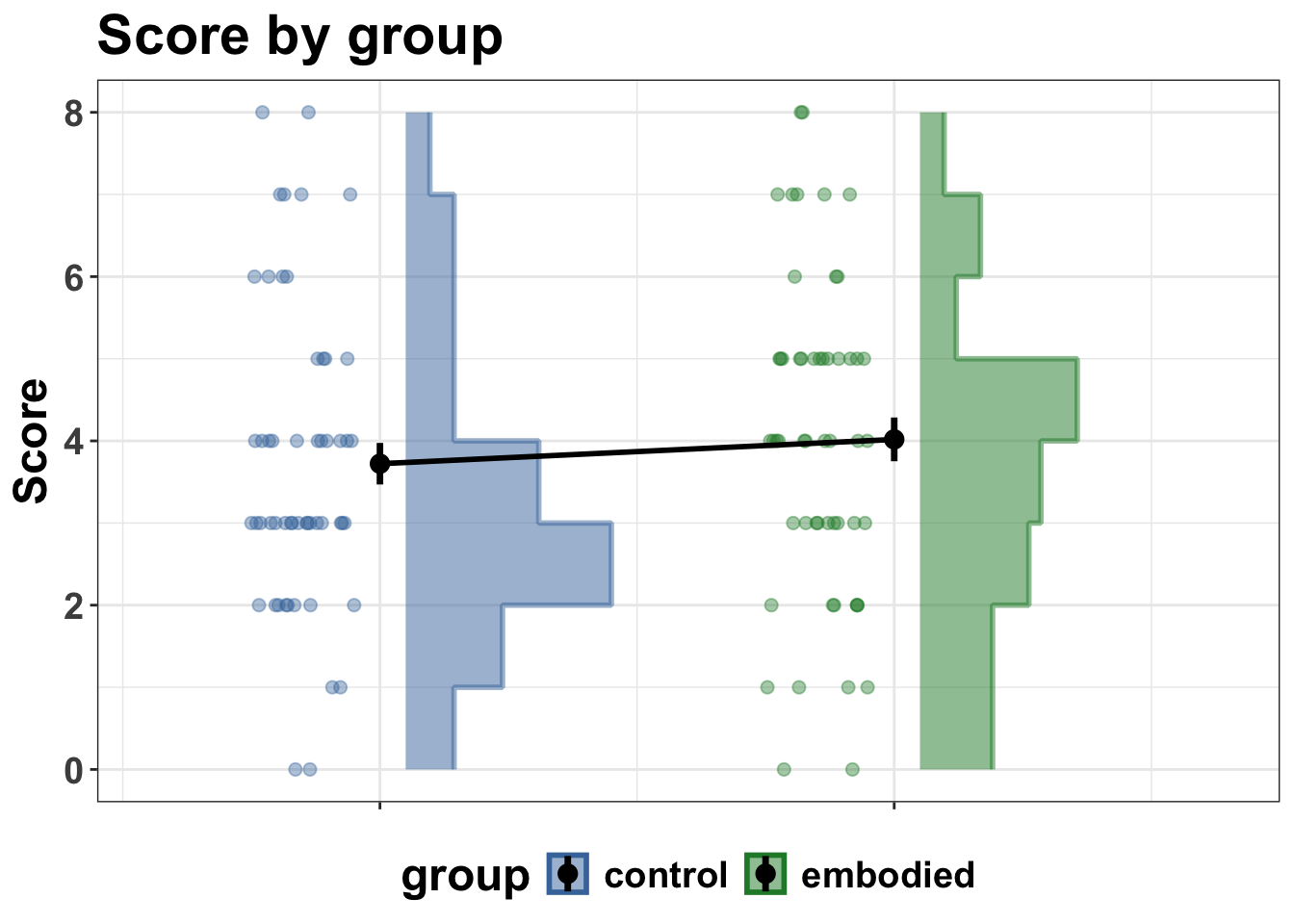
Here we use simulated data, which is based on some of Ipek's PhD data.
So this is not real data, it is synthetic.
But it has the structure of the dataset collected by Ipek.
And this is useful when it comes to guiding expectations regarding such things as typical effect sizes and variability that one might expect from very similar research designs, measures, populations and sample sizes.
Here we read the data in and simplify the research design for the ease of this worked example.
```{r}
#| label: read-data
#| code-fold: false
sim_dat <- read_csv(
  "data/sim_dat.csv",
  show_col_types = FALSE
) |>
  filter(test_time == "delay") |>
  select(-test_time) |>
  mutate(
    group = factor(
      group,
      levels = c("control", "embodied")
    )
  )
head(sim_dat)
# glimpse(sim_dat)
# summary(sim_dat)
```
read models (if already computed, as they have been in this example project)
```{r}
#| label: read-models
#| code-fold: false
#| eval: true # always runs — fast
fit_b1 <- readRDS("models/fit_b1.rds")
```
# 2. Summarise and plot the data
summarise
```{r}
#| label: summarise-sim-data
#| code-fold: false
sim_summary <- sim_dat |>
  filter(!is.na(correct)) |>
  summarise(
    score = sum(correct),
    n_items = n(),
    .by = c(pid, group)
  ) |>
  arrange(pid, group)

head(sim_summary)
# glimpse(sim_summary)
```
plot
```{r}
#| label: plot-sim-data
#| code-fold: true
group_colours <- c(control = "#4477AA", embodied = "#228833")

p1 <- sim_summary |>
  ggplot(aes(y = score, fill = group, colour = group)) +
  # histogram slab nudged right
  stat_slab(
    aes(x = as.numeric(group) + 0.05, thickness = after_stat(pdf)),
    side = "right",
    scale = 0.4,
    alpha = 0.5,
    density = "histogram",
    breaks = breaks_fixed(width = 1)
  ) +
  # dots nudged left with jitter
  geom_point(
    aes(x = as.numeric(group) - 0.15),
    position = position_jitter(width = 0.1, height = 0),
    alpha = 0.4,
    size = 2
  ) +
  # mean + SE at centre
  stat_summary(
    aes(x = as.numeric(group)),
    fun.data = mean_se,
    geom = "pointrange",
    colour = "black",
    size = 0.6,
    linewidth = 1.2
  ) +
  stat_summary(
    aes(x = as.numeric(group), group = 1),
    fun = mean,
    geom = "line",
    linewidth = 1,
    colour = "black"
  ) +
  scale_x_continuous(
    breaks = 1:2,
    labels = c("control", "embodied"),
    expand = expansion(add = c(0.3, -0.3)) # more space left, less right
  ) +
  scale_fill_manual(values = group_colours, name = "group") +
  scale_colour_manual(values = group_colours, name = "group") +
  labs(
    title = "Score by group",
    x = NULL,
    y = "Score"
  ) +
  theme(
    axis.text.x = element_blank()
  )

print(p1)
#ggsave("figures/sim_dat_rain_plot.png", width = 8, height = 6)
```
# 3. Fit a model
Fit a "maximal" model as specified by the design.
Maximal varying effects (varying effects are "random" effects in frequentist language) model that is specified by the design.
See this paper by Barr et al., (2013) for a clear justification of taking the "maximal" approach:
<https://www.sciencedirect.com/science/article/abs/pii/S0749596X12001180>
To help develop understanding, I will build up to the maximal model here by showing the formulas for two other models first.
1. A single level model formula.
formula <- bf(correct ~ group + pre_score_z)
2. Add varying intercepts by pid.
formula <- bf(correct ~ group + pre_score_z +
(1 | pid))
3. Add varying intercepts and slopes by item_id.
formula <- bf(correct ~ group + pre_score_z +
(1 | pid),
(1 + group | item_id))
But in the below, we will only fit one model, using formula 3.
```{r}
#| label: fit-model-b1
#| eval: false
#| code-fold: false
## formula
formula <- bf(
  correct ~
    group +
    pre_score_z +
    (1 | pid) +
    (1 + group | item_id)
)

## check priors
get_prior(formula, data = sim_dat, family = bernoulli())

## set priors
priors <- c(
  prior(normal(0, 2), class = Intercept),
  prior(normal(0, 1), class = b),
  prior(exponential(1), class = sd),
  prior(lkj(2), class = cor)
)

fit_b1 <- brm(
  formula = formula,
  data = sim_dat,
  family = bernoulli(),
  prior = priors,
  chains = 4,
  cores = 24,
  iter = 4000,
  warmup = 2000,
  seed = 123,
  save_pars = save_pars(all = TRUE),
  file = "models/fit_b1"
)
```
```{r}
#| label: summary-model-b1
#| code-fold: false
#| eval: true
# Summary
summary(fit_b1)
# Diagnostics
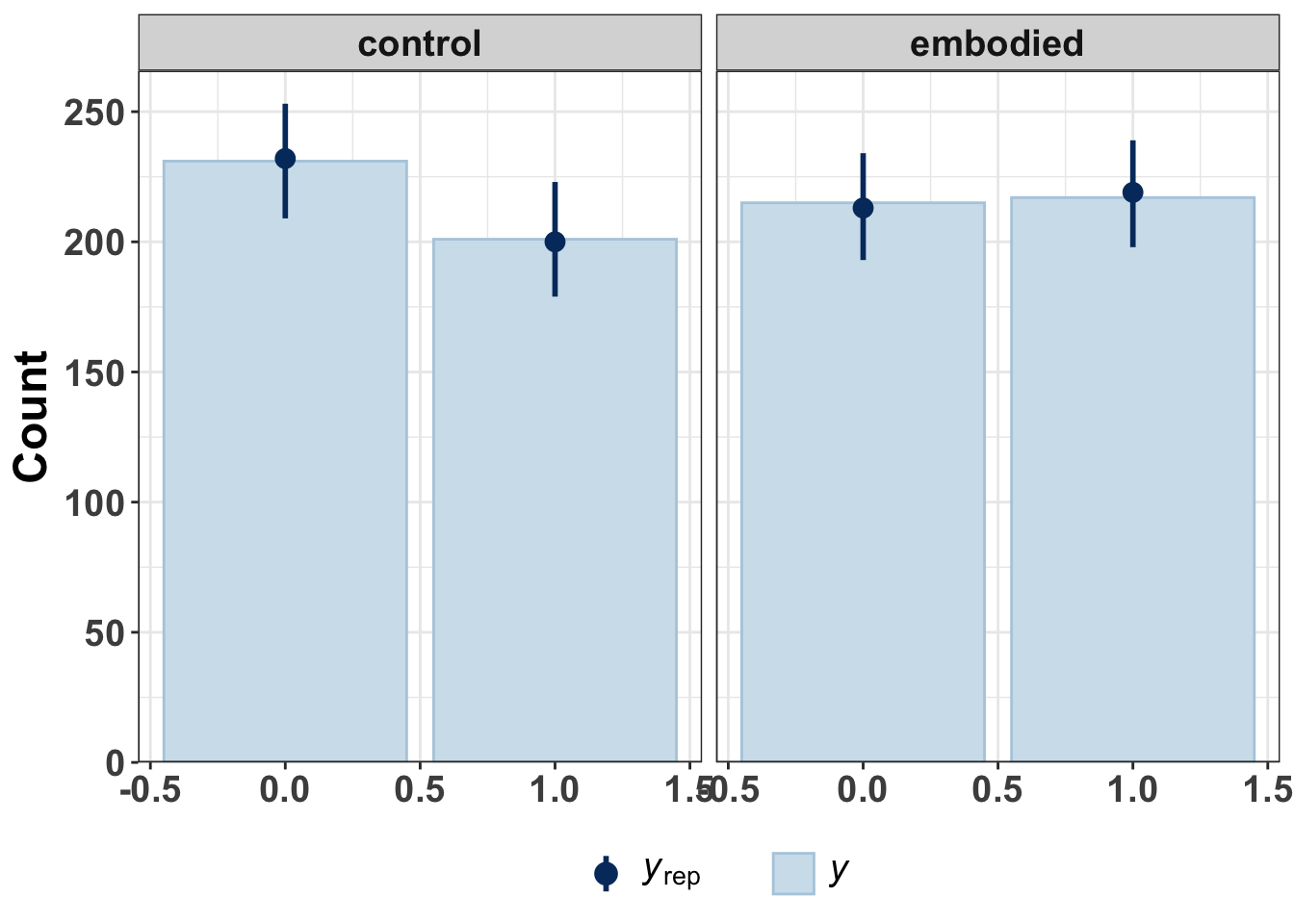
pp_check(fit_b1, ndraws = 100, type = "bars_grouped", group = "group")
```
# 4. Understanding effect sizes under the logit link {#sec-effect-sizes}
This section is hidden to streamline and simplify the chapter.
Click "Show section" to read more on understanding effect sizes in logisitic regression.
<details>
<summary>Show section</summary>
Before running simulations, it is worth establishing a clear mapping between the model's native parameterisation and effect sizes that are interpretable to a general audience.
This section documents that mapping as a reference point for collaborators and for later simulation design.
## The scale problem
Model `fit_b1` uses a Bernoulli likelihood with the logit link, so all regression coefficients live on the **log-odds scale**.
The posterior estimate for `groupembodied` is 0.15 (95% CI: −0.37, 0.68).
This means that being in the embodied group increases the log-odds of a correct response by 0.15 relative to control — a number that is essentially uninterpretable on its own.
There are three useful scales for communicating this effect, each suited to a different audience.
### Scale 1 — Odds ratio
Exponentiating the log-odds coefficient converts it to an **odds ratio** (OR):
```{r}
#| label: odds-ratio
#| code-fold: false
exp(0.15) # point estimate → 1.16
exp(-0.37) # lower 95% CI → 0.69
exp(0.68) # upper 95% CI → 1.97
```
An OR of 1.16 means the odds of a correct response are 16% higher in the embodied group.
ORs are standard in clinical and epidemiological reporting but still require some statistical literacy.
Crucially, the 95% CI on the OR scale [0.69, 1.97] comfortably spans 1.0, reflecting the substantial uncertainty in this estimate.
### Scale 2 — Probability scale
The most interpretable scale for a general audience is the **probability** of a correct response.
Converting from log-odds to probability requires a baseline, which is provided by the model intercept (−0.17 at `pre_score_z = 0`, reference group = control).
The conversion uses the inverse-logit function `plogis()`:
```{r}
#| label: prob-scale
#| code-fold: false
plogis(-0.17) # control group baseline: ~0.46
plogis(-0.17 + 0.15) # embodied group: ~0.50
```
The implied effect in plain language: at average pre-test score, the model estimates roughly **46% correct in control vs. 50% correct in embodied** — a difference of approximately 4 percentage points (Δ*p* ≈ 0.04).
Note that this calculation uses fixed-effect point estimates only and ignores varying effects, so it represents the population-average probability for a hypothetical average item and participant.
Individual participants and items vary substantially around this value (see the varying effects SDs in `summary(fit_b1)`).
### Scale 3 — Cohen's *h*
For collaborators accustomed to thinking in terms of Cohen's *d*, **Cohen's h** is the natural standardised effect size for a difference between two proportions:
```{r}
#| label: cohens-h
#| code-fold: false
# h = 2 * arcsin(sqrt(p1)) - 2 * arcsin(sqrt(p2))
2 * asin(sqrt(0.50)) - 2 * asin(sqrt(0.46)) # → ~0.08
```
Conventional benchmarks for *h*: 0.2 = small, 0.5 = medium, 0.8 = large.
The current point estimate (*h* ≈ 0.08) is well below the conventional small-effect threshold, consistent with the wide posterior credible interval.
### Summary table
The table below shows how different log-odds values translate across all three scales, anchored at the model's estimated baseline (intercept = −0.17, *p*~control~ ≈ 0.46).
These values define the simulation grid used in @sec-sims.
```{r}
#| label: tbl-effect-sizes
#| tbl-cap: "Effect size translations from log-odds to interpretable scales,
#| anchored at the estimated baseline probability for the control group
#| (p ≈ 0.46, corresponding to an intercept of −0.17 on the log-odds scale)."
intercept <- -0.17

effect_sizes <- tibble::tibble(
  label = c("Observed (model estimate)", "Small", "Medium", "Large"),
  log_odds = c(0.15, 0.40, 0.87, 1.39),
  OR = round(exp(log_odds), 2),
  p_control = round(plogis(intercept), 2),
  p_embodied = round(plogis(intercept + log_odds), 2),
  delta_p = round(p_embodied - p_control, 2),
  cohens_h = round(
    2 * asin(sqrt(p_embodied)) - 2 * asin(sqrt(p_control)),
    2
  )
) |>
  dplyr::select(label, log_odds, OR, p_control, p_embodied, delta_p, cohens_h)

knitr::kable(
  effect_sizes,
  col.names = c(
    "Label",
    "Log-odds (β)",
    "Odds ratio",
    "p (control)",
    "p (embodied)",
    "Δp",
    "Cohen's h"
  ),
  align = "lrrrrrr"
)
```
The simulation grid varies `β` across these four levels, crossed with a range of sample sizes.
The log-odds value enters the data-generating process directly; the remaining columns are reported to make clear what each simulation scenario corresponds to substantively.
## From effect sizes to posterior inference
Once a simulated dataset has been generated and a model fitted, effect sizes are recovered on the probability scale using `add_epred_draws()`, rather than point estimates.
This properly propagates both parameter uncertainty and the varying effects structure:
```{r}
#| label: epred-workflow
#| eval: false
#| code-fold: false
# newdata grid: one row per group, pre_score_z held at 0
nd <- tibble::tibble(
  group = c("control", "embodied"),
  pre_score_z = 0
)

# posterior over Δp for a single fitted model
delta_p_post <- b_sim |>
  tidybayes::add_epred_draws(newdata = nd) |>
  tidybayes::compare_levels(.epred, by = group) |>
  dplyr::summarise(
    median = median(.epred),
    q025 = quantile(.epred, 0.025),
    q975 = quantile(.epred, 0.975),
    width = q975 - q025
  )
```
Two notes on terminology worth clarifying for collaborators:
- **`add_epred_draws()`** returns the posterior over the *expected probability*
— i.e., `plogis(η)` for each draw — and is the right tool for estimating and comparing group-level probabilities. It does *not* return 0/1 outcomes.
- **`posterior_predict()`** goes one step further, drawing a 0 or 1 from `Bernoulli(p)` for each draw. This adds observation-level noise on top of parameter uncertainty and is primarily useful for posterior predictive checks (e.g., `pp_check()`), not for effect size estimation.
### Precision as the target, not just power
In a Bayesian simulation study, the most natural design target is **posterior precision**, rather than a binary powered/underpowered verdict.
Across simulation iterations, we can summarise:
- **Directional accuracy**: proportion of iterations where the posterior median is in the correct direction.
- **95% CI exclusion**: proportion of iterations where the 95% credible interval on Δ*p* excludes zero (the NHST-adjacent criterion).
- **Interval width**: mean width of the 95% CI on Δ*p* across iterations — how precisely can we estimate the accuracy difference at a given *N*?
The last metric is arguably the most useful for design decisions: rather than asking "can we detect the effect?", we ask "how precisely can we characterise it?".
For example, a width of ±5 percentage points on Δ*p* means we can estimate the accuracy difference to within that margin, which is directly meaningful to a collaborator unfamiliar with null hypothesis testing.
</details>
# 5. Before we simulate: key questions and considerations
The previous section established how to read and translate the effect size estimates from model `fit_b1`.
Before proceeding to formal simulations, it is worth pausing to ask a set of questions.
This is not a mechanical step.
It is a scientific one: the goal is to arrive at the simulation with a clear sense of *what we are trying to learn* and *what design choices are still open*.
The three questions below are not independent.
They have a natural dependency structure, and working through them in order prevents a common error in study planning — optimising precision for an effect that may not be worth pursuing, or scaling up a design that could be restructured more efficiently.
For some really helpful background context to effect sizes in psychological research more generally, I recommend first reading this paper by Funder and Ozer [@funderEvaluatingEffectSize2019].
---
## 5.1 Is the effect plausibly large enough to be worth pursuing?
This is the first and most important question, and it is one that pilot data with wide uncertainty can still inform to some degree.
With this said, we should always keep in mind that if pilot data is based on a tiny fraction of a "typical" dataset, then it will suffer from sampling variability to a larger degree and thus provide over- or under-estimates of the true population value of interest.
The posterior estimate for the group effect in `fit_b1` is β = 0.15 on the log-odds scale (95% CI: −0.37, 0.68), corresponding to Δ*p* ≈ 4 percentage points at the estimated baseline.
As the effect size table in @sec-effect-sizes shows, even the upper bound of the credible interval (~16pp, *h* ≈ 0.32) would constitute only a small-to-moderate effect by conventional benchmarks.
The lower bound is consistent with no effect or even a small negative effect.
This is not a reason to abandon the research question.
But it does frame the simulation work that follows: we are not in a situation where the effect is clearly present and the only question is how much data we need to estimate it precisely.
We are in a situation where we need to ask:
- What is the **minimum effect size that would be theoretically meaningful** or
practically relevant for this intervention? If a 4pp improvement in accuracy
is too small to justify adoption, then we need a design sensitive enough to
rule it *out* as well as detect it when present.
- What does the **wider literature** on embodied learning suggest about plausible
effect magnitudes? If comparable interventions typically produce effects in the
10–20pp range, the pilot estimate is consistent with that and the question
shifts to precision. If the literature suggests larger effects, the pilot may
be flagging a design problem rather than a small true effect.
The simulation grid in @sec-sims varies β across the range established in @sec-effect-sizes precisely to avoid committing to a single assumed effect size.
Power and precision are reported as a function of β or sample size, so the reader can evaluate their own substantive threshold on the resulting curves.
---
## 5.2 What does more data buy us, and how much more is feasible?
Assuming the effect is worth pursuing, the next question is whether *more of the same design* — more participants, same between-person structure — is a viable path to adequate precision.
Two features of the pilot data are relevant here.
First, the **between-person variance is large**: the varying intercept SD for participants is estimated at 1.03 on the log-odds scale.
This is substantial.
It means there is considerable variability in overall accuracy across individuals, and this variability is pure noise in a between-person comparison — it inflates the uncertainty around the group effect without contributing any information about it.
Any between-person design is fighting against this variance.
Second, the **item-level variance is also non-trivial** (SD(item intercept) = 1.24), and there is a varying slope for group across items (SD = 0.19).
This means the effect of the intervention varies somewhat across items, which adds a further source of uncertainty that does not disappear with more participants.
We can already form a rough expectation before simulating: increasing N within the current between-person design will reduce uncertainty in the group effect, but the rate of return will be modest because a large share of the residual variance is structural (between persons, between items) rather than reducible by adding participants alone.
The simulations in @sec-sims quantify this explicitly, but the pilot data already suggest we should think carefully about whether there is a more efficient design available (see @sec-design-change below).
A practical consideration also applies here: what sample sizes are actually feasible?
The current dataset has 108 participants.
Doubling to ~200 may be straightforward; scaling to 500+ may not be.
The simulation section reports precision as a function of N across a range that spans plausible sample size, so collaborators can make an informed judgement about whether the precision gain at a given N justifies the recruitment cost.
---
## 5.3 Does the design itself need to change? {#sec-design-change}
This is often the highest-leverage question, and one that is easy to overlook when the default assumption is that a larger version of the current design is the natural next step.
The current design is **between-person**: each participant is assigned to either the control or embodied condition, contributing data to one group only.
The large between-person variance identified above (SD ≈ 1.03) is a direct cost of this design choice: individual differences in general accuracy are confounded with the group comparison, and the only way to separate them is through random assignment — which works in expectation but leaves substantial residual uncertainty at any finite N.
A **within-person (crossover) design**, in which each participant experiences both conditions (on different items or at different time points), would partition out this between-person variance entirely.
The "group" comparison would then be estimated from within-person differences, removing the largest single source of noise in the current model.
In practical terms, this is often equivalent to running a study with substantially more participants for the same data collection effort — though it introduces its own considerations (order effects, fatigue, item overlap).
And for many research designs in psychology and education research, it is simply not possible to use a within-person design.
---
## 5.4 Summary: a decision sequence
The three questions above have a natural ordering that structures the simulation work that follows:
::: {#fig-pre-sim-flowchart}
```{mermaid}
%%{ init: { 'theme': 'base', 'themeVariables': { 'primaryColor': '#4477AA', 'primaryTextColor': '#ffffff', 'lineColor': '#888888' } } }%%
flowchart TD
  A[Is the effect worth pursuing?] --> B[What does more data buy<br/>within the current design?]
  B --> C{Feasible precision<br/>at realistic N?}
  C -->|Yes| D[Simulate and determine N]
  C -->|No| E[Consider design change first]
```
A flowchart for deciding whether to simulate.
:::
This framing means the simulations in @sec-sims are not a mechanical power calculation.
They are a tool for navigating these decisions with the pilot data as a starting point, and the effect size table in @sec-effect-sizes as the reference for what "large enough" means in interpretable units.
# 6. Run some simulations {#sec-sims}
## 6.1 background sources
The basic structure and code follows the examples outlined by Solomon Kurz in his
'power' blog [posts](https://solomonkurz.netlify.app/tags/power/), and Lisa DeBruine's R package [faux{}](https://www.scienceverse.org/faux/) [@debruineUnderstandingMixedEffectsModels2021].
The faux package [vignettes](https://www.scienceverse.org/faux/articles/) are particularly useful and worthwhile working through.
You could also look at these examples by Rich, which show how you might simulate multi-level data for a range of factorial designs: [https://github.com/rich-ramsey/sim_demo](https://github.com/rich-ramsey/sim_demo).
## 6.2 general approach ##
The basic workflow is as follows:
1. Fit a regression model to data (real or simulated).
2. Use the regression model parameters to simulate new data.
3. Write a function to create 100s or 1000s of datasets and vary parameters of interest (e.g., sample size, trial count, effect size).
4. Summarise the simulated data to estimate likely power or precision of the various research designs.
## 6.3 simulate one dataset
### a simplified example to show the process
Let's just pretend that this is a single level model (no varying effects) with two groups and one testing time.
Maybe not a sensible design, but useful for thinking about simulating data.
There are just two fixed effects.
b0 - intercept (control group) and b1 (embodied group estimate).
```{r}
#| label: create-d0
#| code-fold: false
## set some values
subj_n = 108 # number of subjects in total
group_n = 2 # number of pid groups
item_n = 8 # number of items

# fixed effects
b0 = -0.17 # intercept
b1 = 0.15 # fixed effect groupembodied

## make it reproducible
set.seed(1)
## create the data
d0 <- add_random(subj = subj_n, item = item_n) |>
  add_between("subj", group = c("control", "embodied")) |>
  add_contrast(
    "group",
    "treatment",
    add_cols = TRUE,
    colnames = "group_contrast"
  ) |>
  ## calculate DV in log odds
  mutate(y = b0 + b1 * group_contrast) |>
  ## calculate DV in log odds
  mutate(prob = plogis(y)) |>
  ## calculate outcome
  mutate(correct = rbinom(n(), size = 1, prob = prob))

head(d0)
# glimpse(d0)

## check
# d0 |>
#   group_by(subj, group) |>
#   tally()

## quick plots
d0 |>
  ggplot(aes(x = group, y = prob, colour = group, fill = group)) +
  geom_jitter(alpha = 0.5, height = 0, width = 0.3) +
  scale_y_continuous(limits = c(0, 1)) +
  facet_wrap(~item, nrow = 2)
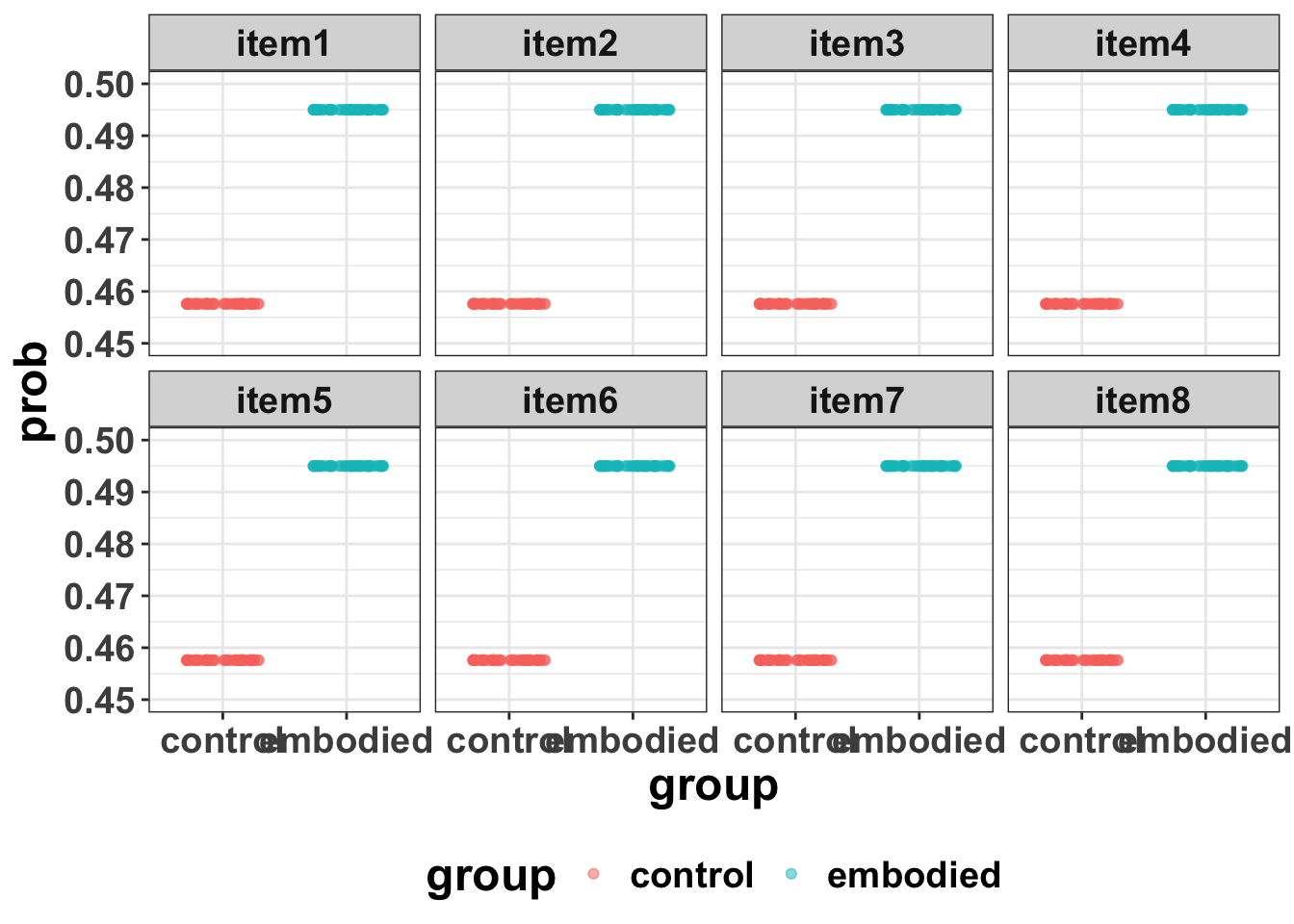
## and zoom in to make the tiny effect of group easier to see
d0 |>
  ggplot(aes(x = group, y = prob, colour = group, fill = group)) +
  geom_jitter(alpha = 0.5, height = 0, width = 0.3) +
  scale_y_continuous(limits = c(0.45, 0.5)) +
  facet_wrap(~item, nrow = 2)
```
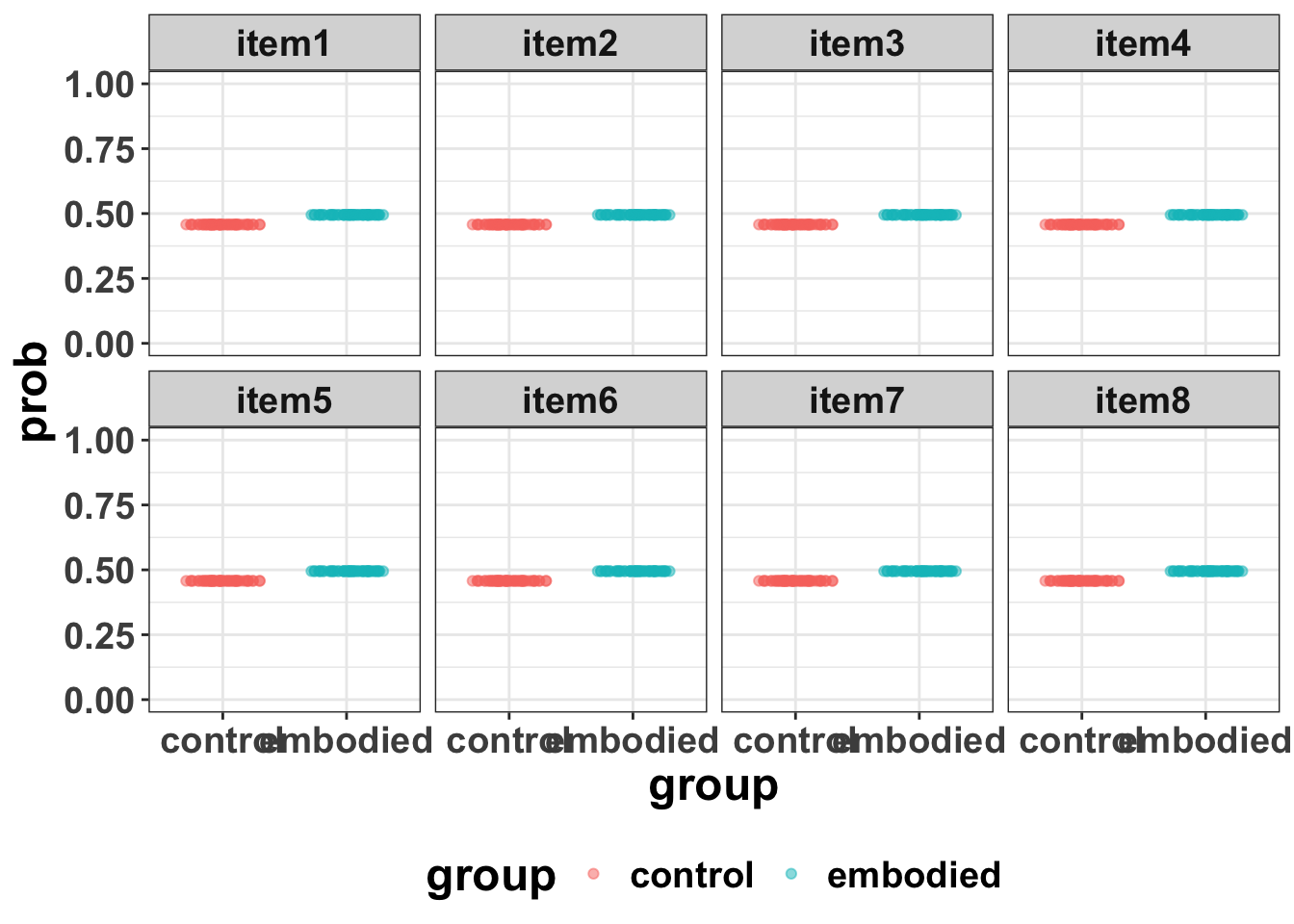
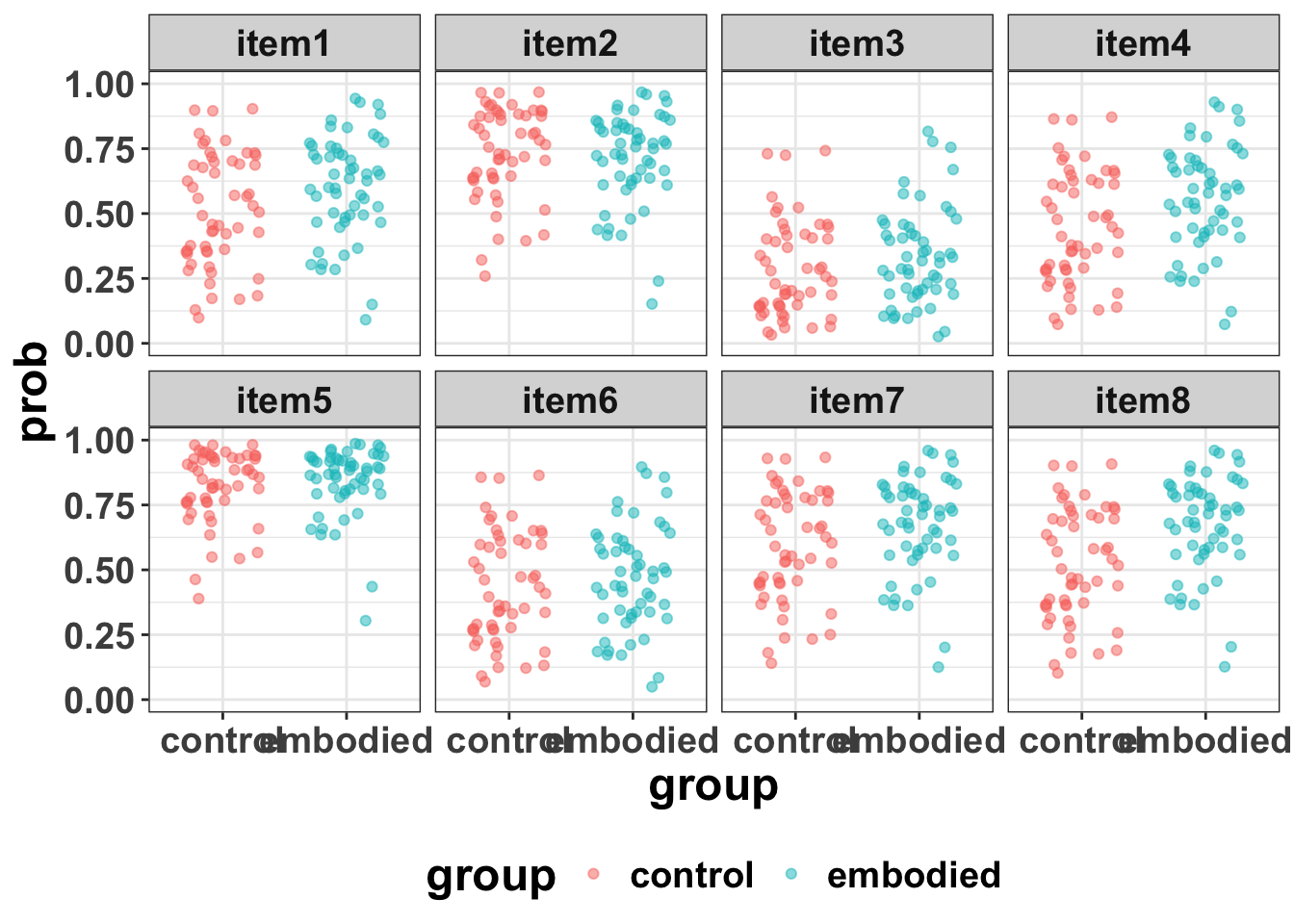
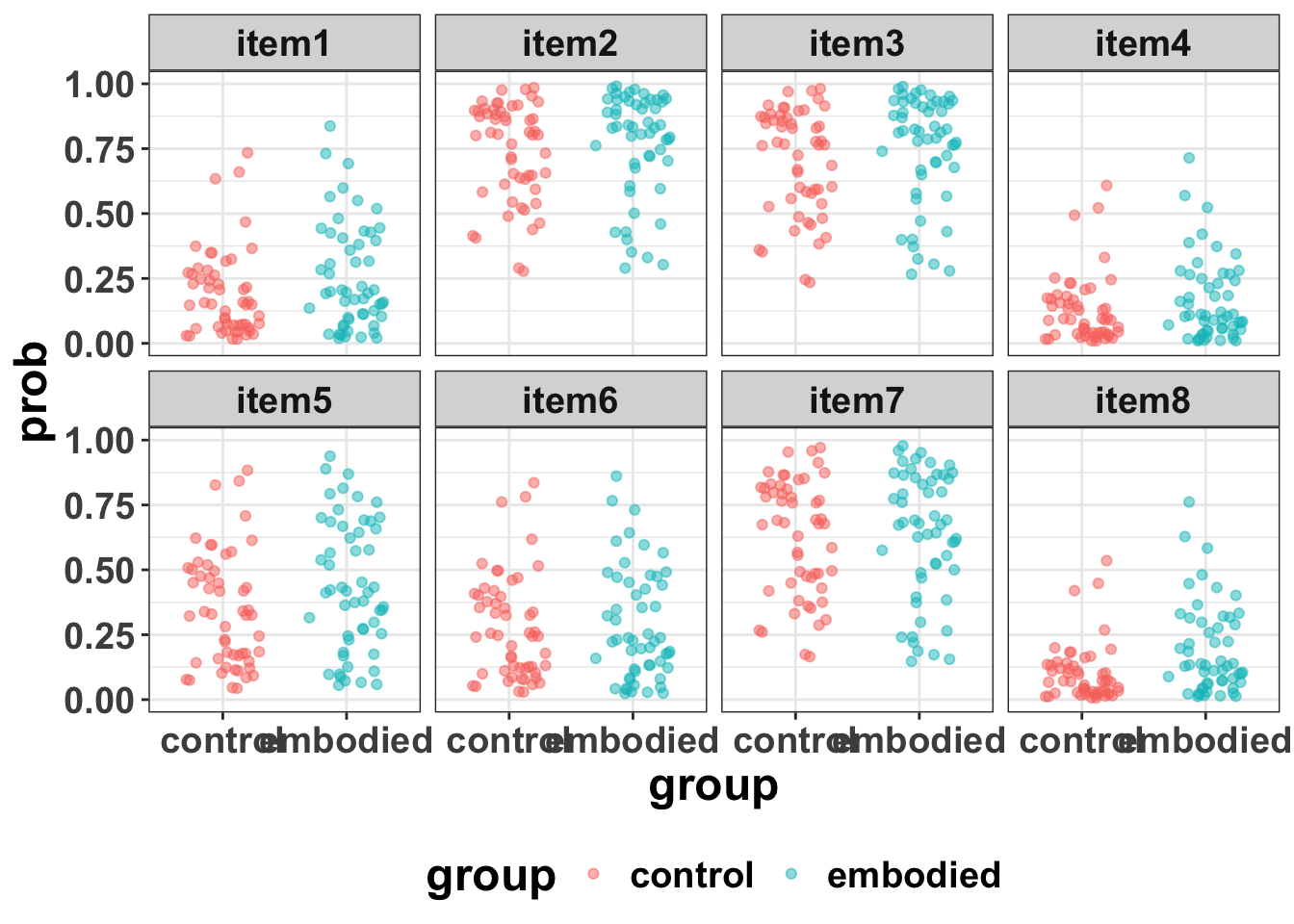
The point here is just to see that a "fixed effect only" model has the same probability estimate for all participants (dots in the plot) and all items (facets in the plot).
That is nothing new, it merely shows what a fixed-effects only model is doing.
And it makes clear the relatively unrealistic assumptions that that kind of model entails.
It is not that these models cannot be useful, just that when you study human beings, as well as a variety of different stimuli/items, they are likely to be more variable.
And for this kind of fixed-effects only model, if you are ok with using frequentist stats, then a programme like G*Power would be fine to give you a ballpark estimate of power.
But in most cases, a more complex model would seem better suited to studying human behaviour [@barrRandomEffectsStructure2013; @mcelreathStatisticalRethinkingBayesian2020].
### now, a more realistic model
We already have the model object (fit_b1) fitted to existing data, so (1) in the above workflow has been completed.
Look at the model as a reminder
```{r}
#| label: read-model-fit-b1
#| code-fold: false
## read in the model if necessary
# fit_b1 <- readRDS("models/fit_b1.rds")
summary(fit_b1)
## and look at the data
# head(sim_dat)
# summary(sim_dat)

## 432 / 8 items = 54 pids per group

# sim_dat |>
#   group_by(group) |>
#   distinct(item_id) |>
#   arrange(group, item_id)
```
set some values based on the model
```{r}
#| label: set-values-d1
#| code-fold: false
## set some values

subj_n = 108 # number of subjects in total
group_n = 2 # number of pid groups
item_n = 8 # number of items

# fixed effects
b0 = -0.17 # intercept
b1 = 0.15 # fixed effect groupembodied
b2 = 0.31 # fixed effect pre_score_z

# varying effects
## item_id
u0i_sd = 1.24 # varying intercept SD for items
u1i_sd = 0.19 # varying b1 slope SD for items (effect of groupembodied)
r01i = -0.11 # correlation between varying effects 0 and 1 for items

## subject id
u0s_sd = 1.03 # varying intercept SD for subjects
```
Create the data using faux
```{r}
#| label: create-d1
#| code-fold: false
## make it reproducible
set.seed(1)
## create the data
d1 <- add_random(subj = subj_n, item = item_n) |>
  add_between("subj", group = c("control", "embodied")) |>
  add_contrast(
    "group",
    "treatment",
    add_cols = TRUE,
    colnames = "group_contrast"
  ) |>
  add_ranef("subj", u0s = u0s_sd, pre_score_z = 1, .cors = 0) |>
  add_ranef("item", u0i = u0i_sd, u1i = u1i_sd, .cors = r01i) |>
  ## calculate DV in log odds
  mutate(y = b0 + u0s + u0i + (b1 + u1i) * group_contrast + b2 * pre_score_z) |>
  ## calculate DV in log odds
  mutate(prob = plogis(y)) |>
  ## calculate outcome
  mutate(correct = rbinom(n(), size = 1, prob = prob))

head(d1)
# glimpse(d1)

## run some checks

## test it for row 1 of the dataframe
# y = b0    + u0s   + u0i   + (b1   + u1i)  * group_contrast + b2   * pre_score_z
#   = -0.17 + 0.757 + 0.387 + (0.15 + 0.212) * 0             + 0.31 * 0.250
#   = -0.17 + 0.757 + 0.387 + 0                               + 0.0775
#   = 1.0515

## that seems in the right range - but run a quick sim to check
# replicate(1000, {
#   dat <- add_random(subj = subj_n, item = item_n) |>
#     add_between("subj", group = c("control", "embodied")) |>
#     add_ranef("subj", u0s = u0s_sd, pre_score_z = 1, .cors = 0) |>
#     summarise(u0s = first(u0s), pre_score_z = first(pre_score_z), .by = subj)
#   cor(dat$u0s, dat$pre_score_z)
# }) |>
#   quantile(c(0.025, 0.5, 0.975))
## this looks sensible
#  2.5%          50%        97.5%
# -0.171272951 -0.001374927  0.186254182

## check some counts
# d1 |>
#   group_by(subj, group) |>
#   tally()

## quick plots
d1 |>
  ggplot(aes(x = group, y = prob, colour = group, fill = group)) +
  geom_jitter(alpha = 0.5, height = 0, width = 0.3) +
  scale_y_continuous(limits = c(0, 1)) +
  facet_wrap(~item, nrow = 2)
# d1 |>
#   ggplot(aes(x = group, y = prob, colour = group)) +
#   geom_boxplot(alpha = 0.5)

# d1 |>
#   ggplot(aes(x = group, y = prob, colour = group, fill = group)) +
#   geom_violin(alpha = 0.5)

# d1 |>
#   ggplot(aes(x = prob, colour = group, fill = group)) +
#   geom_density(alpha = 0.5)
```
and some notes of the params
```{r}
#| label: tbl-dgp-terms
#| tbl-cap: "Decomposition of the linear predictor in the data-generating process.
#| Each term corresponds directly to a parameter estimated by model `fit_b1`.
#| group_contrast = 0 for control participants, so the entire group effect
#| term drops out for that group."
dgp_terms <- tibble::tibble(
  Term = c(
    "`b0`",
    "`u0s`",
    "`u0i`",
    "`(b1 + u1i) * group_contrast`",
    "`b2 * pre_score_z`"
  ),
  Type = c(
    "Fixed effect",
    "Varying effect (subject)",
    "Varying effect (item)",
    "Fixed + varying effect (group × item)",
    "Fixed effect (covariate)"
  ),
  Value = c(
    "-0.17",
    "SD = 1.03",
    "SD = 1.24",
    "b1 = 0.15, SD(u1i) = 0.19",
    "b2 = 0.31"
  ),
  Interpretation = c(
    "Average log-odds of correct for a control participant on an average item with average pre-score",
    "This participant's deviation from average — are they generally more or less accurate?",
    "This item's deviation from average — is it generally harder or easier?",
    "The group effect: average across items (b1) plus this item's specific deviation (u1i), active only when group_contrast = 1",
    "Pre-test score contribution — each SD shift in pre-score moves log-odds by 0.31"
  )
)

knitr::kable(
  dgp_terms,
  col.names = c("Term", "Type", "Value", "Interpretation"),
  align = "llll"
)
```
## 6.4 fit a model to the simulated data d1 ##
Here we fit a model and look at the output.
```{r}
#| label: fit-sim-b1
#| eval: false
## formula
formula <- bf(
  correct ~
    group +
    pre_score_z +
    (1 | subj) +
    (1 + group | item)
)

## check priors
get_prior(formula, data = d1, family = bernoulli())

## set priors
priors <- c(
  prior(normal(0, 2), class = Intercept),
  prior(normal(0, 1), class = b),
  prior(exponential(1), class = sd),
  prior(lkj(2), class = cor)
)

sim_b1 <- brm(
  formula = formula,
  data = d1,
  family = bernoulli(),
  prior = priors,
  chains = 4,
  cores = 24,
  iter = 4000,
  warmup = 2000,
  seed = 123,
  control = list(adapt_delta = 0.95),
  save_pars = save_pars(all = TRUE),
  file = "models/sim_b1"
)

# Diagnostics
summary(sim_b1)
pp_check(sim_b1, ndraws = 100, type = "bars_grouped", group = "group")
```
and now we can update the fit to save time
```{r}
#| label: create-d2
## make it reproducible
set.seed(2)
## create the data
d2 <- add_random(subj = subj_n, item = item_n) |>
  add_between("subj", group = c("control", "embodied")) |>
  add_contrast(
    "group",
    "treatment",
    add_cols = TRUE,
    colnames = "group_contrast"
  ) |>
  add_ranef("subj", u0s = u0s_sd, pre_score_z = 1, .cors = 0) |>
  add_ranef("item", u0i = u0i_sd, u1i = u1i_sd, .cors = r01i) |>
  ## calculate DV in log odds
  mutate(y = b0 + u0s + u0i + (b1 + u1i) * group_contrast + b2 * pre_score_z) |>
  ## calculate DV in log odds
  mutate(prob = plogis(y)) |>
  ## calculate outcome
  mutate(correct = rbinom(n(), size = 1, prob = prob))

head(d2)
# glimpse(d2)

## quick plots
d2 |>
  ggplot(aes(x = group, y = prob, colour = group, fill = group)) +
  geom_jitter(alpha = 0.5, height = 0, width = 0.3) +
  scale_y_continuous(limits = c(0, 1)) +
  facet_wrap(~item, nrow = 2)
# d2 |>
#   ggplot(aes(x = group, y = prob, colour = group)) +
#   geom_boxplot(alpha = 0.5)
```
and now update the fit - this is probably unnecessary here, as the model fits are fast anyway.
But it would be useful for fits that take a longer period of time.
```{r}
#| label: update-sim-b1
#| eval: false
update_sim_b1 <-
  update(sim_b1, newdata = d2, seed = 2)

summary(update_sim_b1)
pp_check(update_sim_b1, ndraws = 100, type = "bars_grouped", group = "group")
```
## 6.5 create a function to simulate and fit multiple datasets
```{r}
#| label: sim-function
#| code-fold: false
# these can be changed when calling the function
sim <- function(
  subj_n = 100,
  item_n = 8,
  # fixed effects
  b0 = -0.17,
  b1 = 0.15,
  b2 = 0.31,
  # varying effects by items
  u0i_sd = 1.24,
  u1i_sd = 0.19,
  # varying effects by subjects
  u0s_sd = 1.03,
  # cors
  r01i = -0.11, # correlation between varying effects 0 and 1 for items
  ... # helps the function work with pmap() below
) {
  # set up data structure
  data <- add_random(subj = subj_n, item = item_n) |>
    add_between("subj", group = c("control", "embodied")) |>
    add_contrast(
      "group",
      "treatment",
      add_cols = TRUE,
      colnames = "embodied"
    ) |>
    add_ranef("subj", u0s = u0s_sd, pre_score_z = 1, .cors = 0) |>
    add_ranef("item", u0i = u0i_sd, u1i = u1i_sd, .cors = r01i) |>
    ## calculate DV in log odds
    mutate(
      y = b0 + u0s + u0i + (b1 + u1i) * embodied + b2 * pre_score_z
    ) |>
    ## calculate DV in log odds
    mutate(prob = plogis(y)) |>
    ## calculate outcome
    mutate(correct = rbinom(n(), size = 1, prob = prob)) |>
    ## rename to match fit_b1 column names
    rename(pid = subj, item_id = item)
  #glimpse(data) # only use this when testing the code
}
```
Here’s a quick example of how our function works.
```{r}
#| label: test-sim-function
#| code-fold: false
sim(subj_n = 100)
# if you uncomment glimpse above, it will let you glimpse the data that's generated.
# this is useful for checking / testing code purposes.
# and you can vary any parameters, as you wish.
```
## 6.6 iterate through multiple sims
let's scale it up to multiple reps and only save the parameters of interest rather than the full brms model and the data.
Note 1: the advantage of not saving the brms model and data is that it saves memory, which can easily be exhausted with 1000s of sims.
The disadvantage is that you data and models cannot be explored/summarised afterwards because they are not kept.
Note 2: model size/complexity of course determines how long this process will take. e.g., if a model takes 10s, 1 minute or 5 hours to build, then there are legitimate constraints placed on simulations and maybe using a HPC like Euler might be useful.
```{r}
#| label: run-sims
#| eval: false
#| code-fold: false
## now try 100 iterations
x_100 <- crossing(
  rep = 1:100,
  subj_n = c(100, 150, 200),
  b1 = c(0.15, 0.40, 0.87, 1.39),
) |>
  mutate(d = pmap(pick(everything()), sim)) |>
  mutate(
    params = future_map2(
      d,
      rep,
      \(data, seed) {
        update(fit_b1, newdata = data, seed = seed, cores = 1) |>
          fixef() |>
          data.frame() |>
          rownames_to_column("parameter")
      },
      .options = furrr_options(
        seed = TRUE,
        packages = c("brms", "tidyverse")
      ),
      .progress = TRUE
    )
  ) |>
  select(-d)

head(x_100)
glimpse(x_100)

p_100 <- unnest(x_100, params) |>
  mutate(
    parameter = str_replace(parameter, "groupgroup_contrast", "groupembodied")
  )
head(p_100)

write_csv(p_100, "data/p_100_sims.csv")
```
# 7. Let's look at the output
## 7.1 quick plots and summaries
```{r}
#| label: plot-params
## read in if previously computed
p_100 <- read_csv(
  "data/p_100_sims.csv",
  show_col_types = FALSE
)
# head(p_100)

## quick plot
# p_100 |>
#   ggplot(aes(x = parameter, y = Estimate)) +
#   stat_halfeye(alpha = 0.7) +
#   facet_grid(fct_rev(as.factor(b1)) ~ subj_n)

## summary
## quick look
# p_100 |>
#   group_by(subj_n, b1, parameter) |>
#   median_qi(Estimate) |>
#   print(n = Inf)

## save it
param_qi <- p_100 |>
  group_by(subj_n, b1, parameter) |>
  median_qi(Estimate)
# head(param_qi)

write_csv(param_qi, "data/param_qi.csv")

## plot params separately
## split by parameter and plot separately
params_list <- c("Intercept", "groupembodied", "pre_score_z")

plots <- params_list |>
  map(\(param) {
    p_100 |>
      filter(parameter == param) |>
      ggplot(aes(x = as.factor(subj_n), y = Estimate)) +
      stat_halfeye(alpha = 0.7) +
      geom_hline(
        yintercept = case_when(
          param == "groupembodied" ~ NA, ## add true b1 differently - see below
          param == "pre_score_z" ~ 0.31,
          param == "Intercept" ~ -0.17
        ),
        linetype = "dashed",
        colour = "red",
        linewidth = 0.6
      ) +
      facet_wrap(~b1, nrow = 1, labeller = label_both) +
      labs(
        title = param,
        x = "N (subjects)",
        y = "Estimate"
      )
  })

## print individually
plots[[1]] # Intercept
#plots[[2]] # groupembodied
plots[[3]] # pre_score_z
## separate lines for b1
p_group_embodied <- p_100 |>
  filter(parameter == "groupembodied") |>
  ggplot(aes(x = as.factor(subj_n), y = Estimate)) +
  stat_halfeye(alpha = 0.7) +
  geom_hline(
    aes(yintercept = b1),
    linetype = "dashed",
    colour = "red",
    linewidth = 0.6
  ) +
  facet_wrap(~b1, nrow = 1, labeller = label_both) +
  labs(
    title = "groupembodied",
    x = "N (subjects)",
    y = "Estimate"
  )
p_group_embodied
#ggsave("figures/p_intercept.png", plots[[1]], width = 8, height = 6)
#ggsave("figures/p_group_embodied.png", p_group_embodied, width = 8, height = 6)
#ggsave("figures/p_pre_score_z.png", plots[[3]], width = 8, height = 6)
```
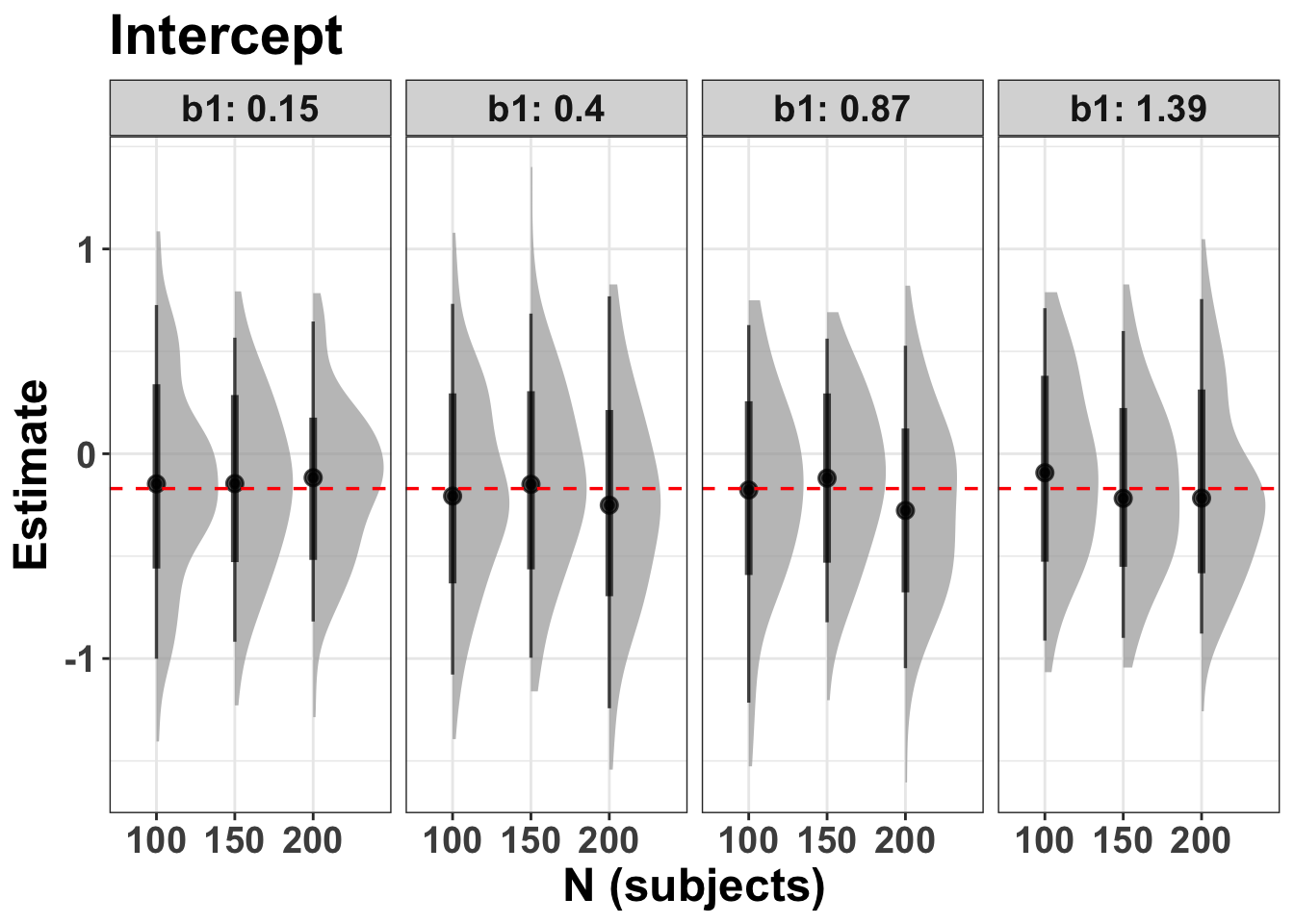
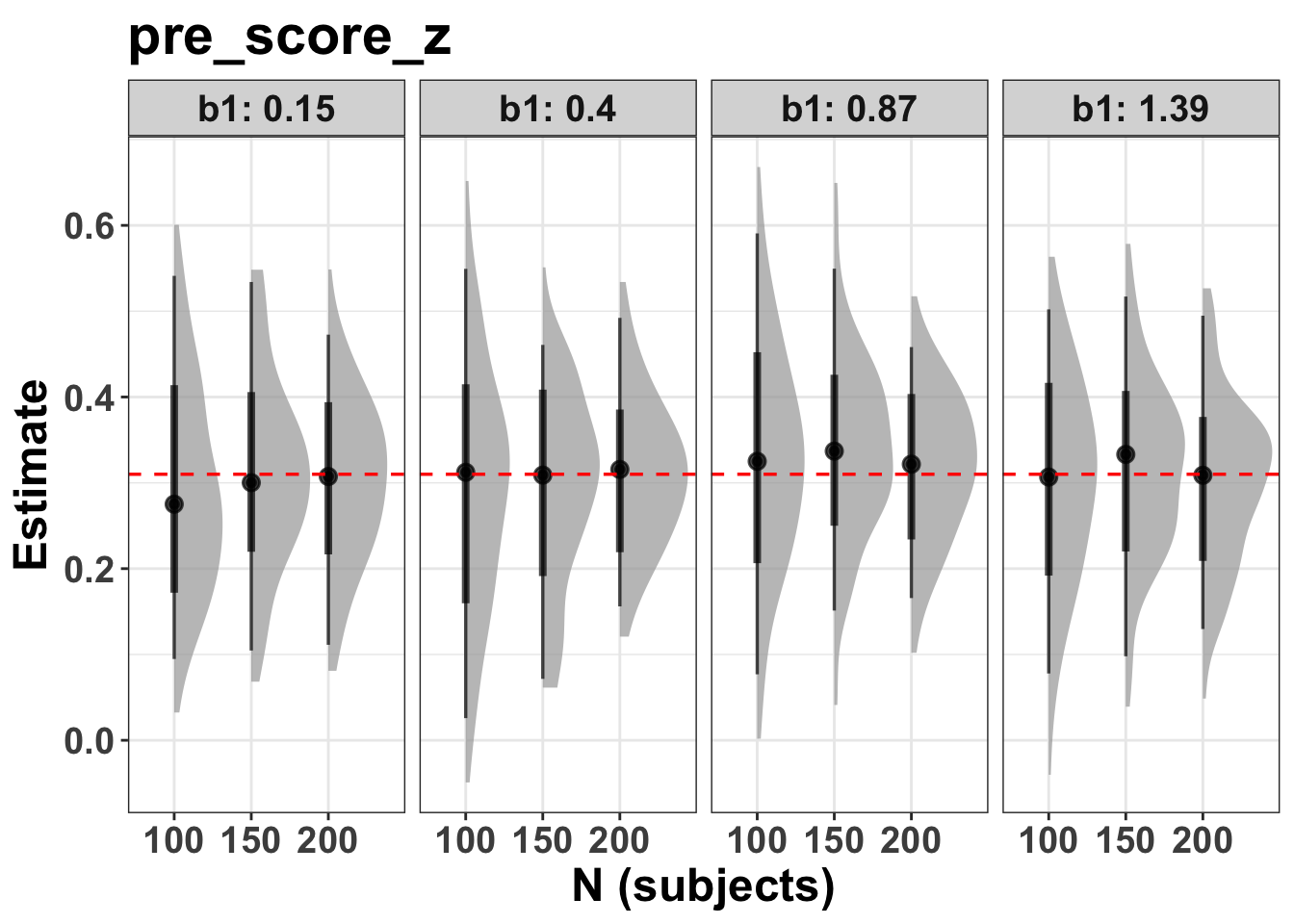
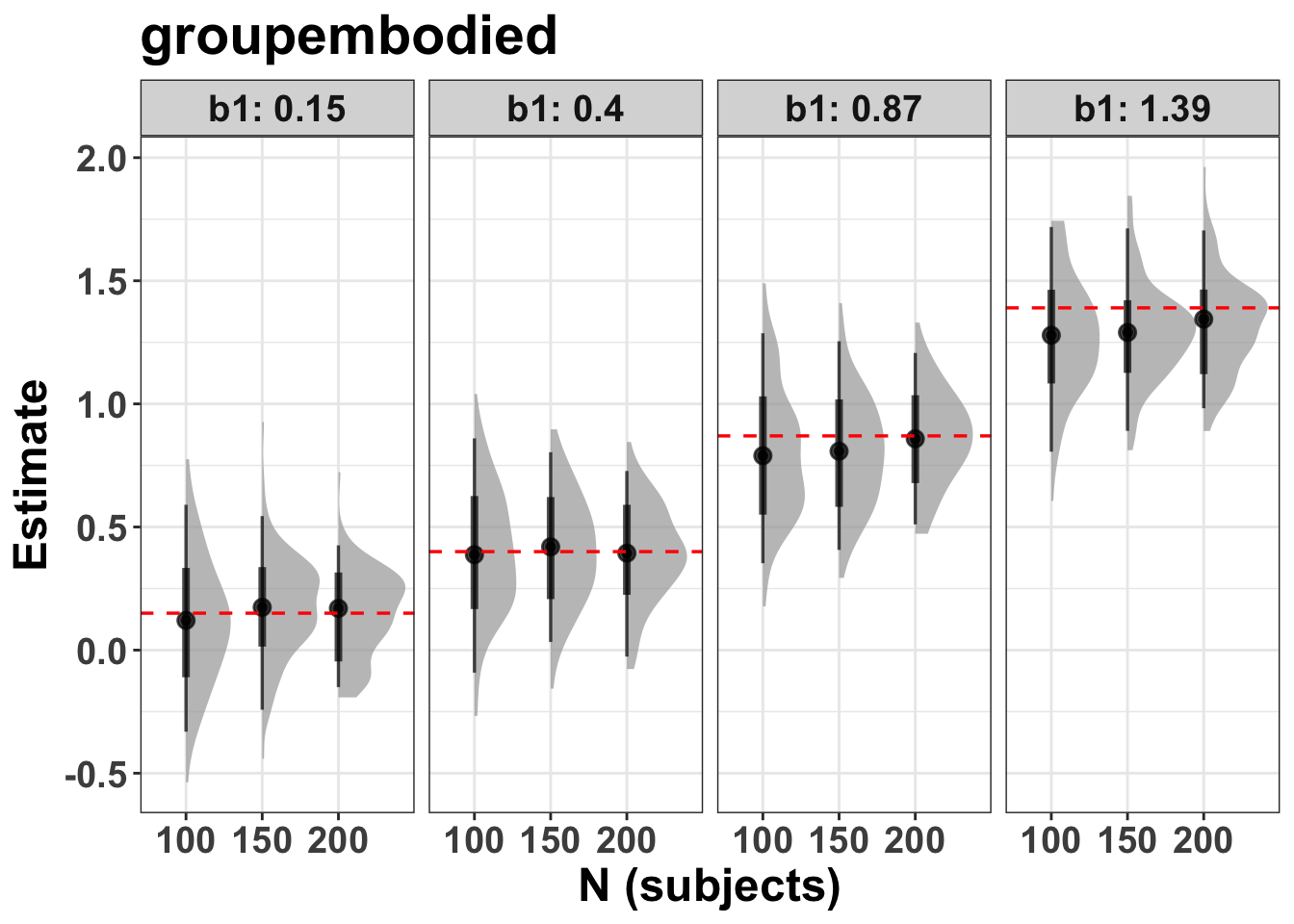
ok, at this point the parameter recovery looks sensible, such that the distributions nicely overlap their target values.
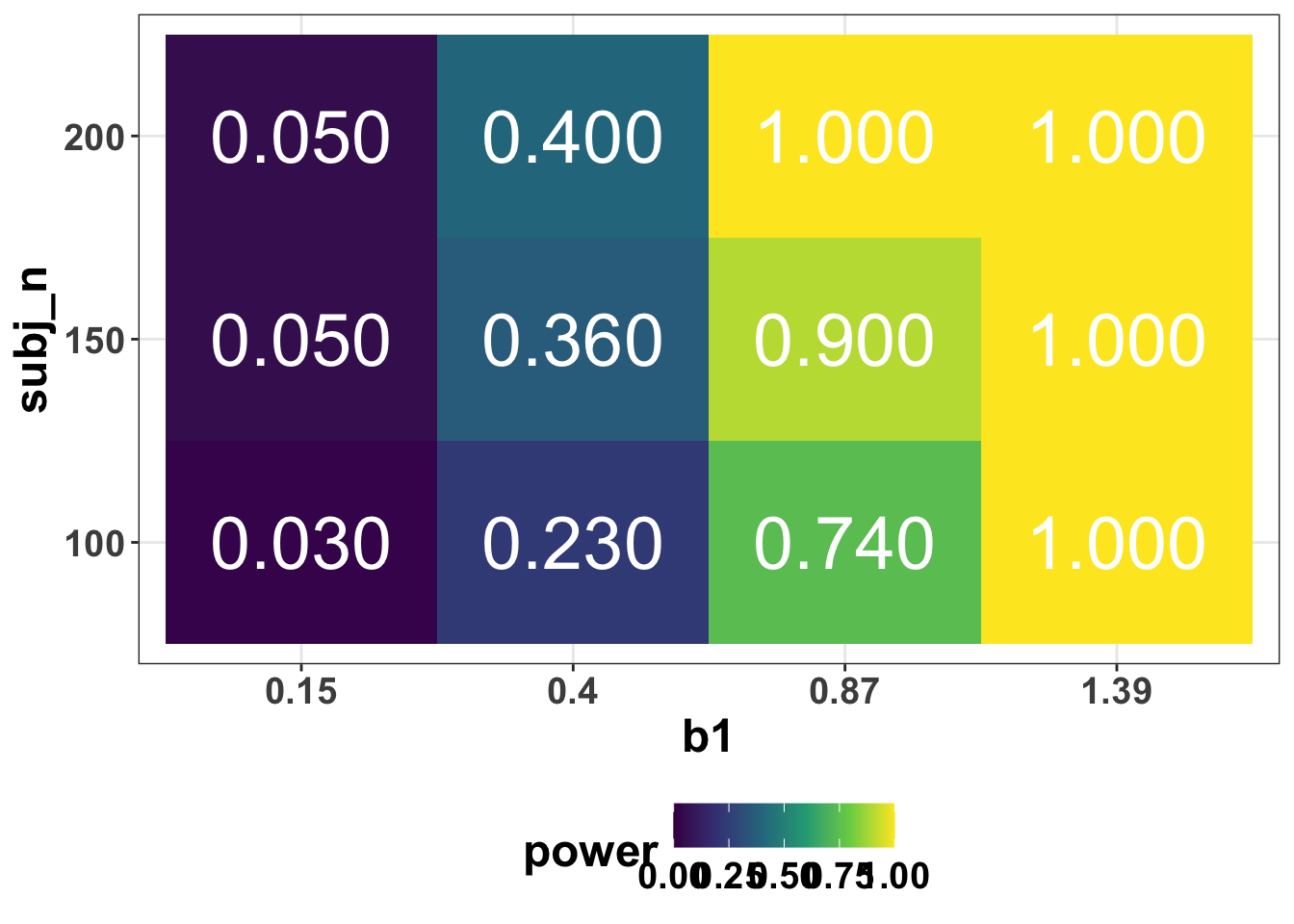
But what about statistical "power" or precision?
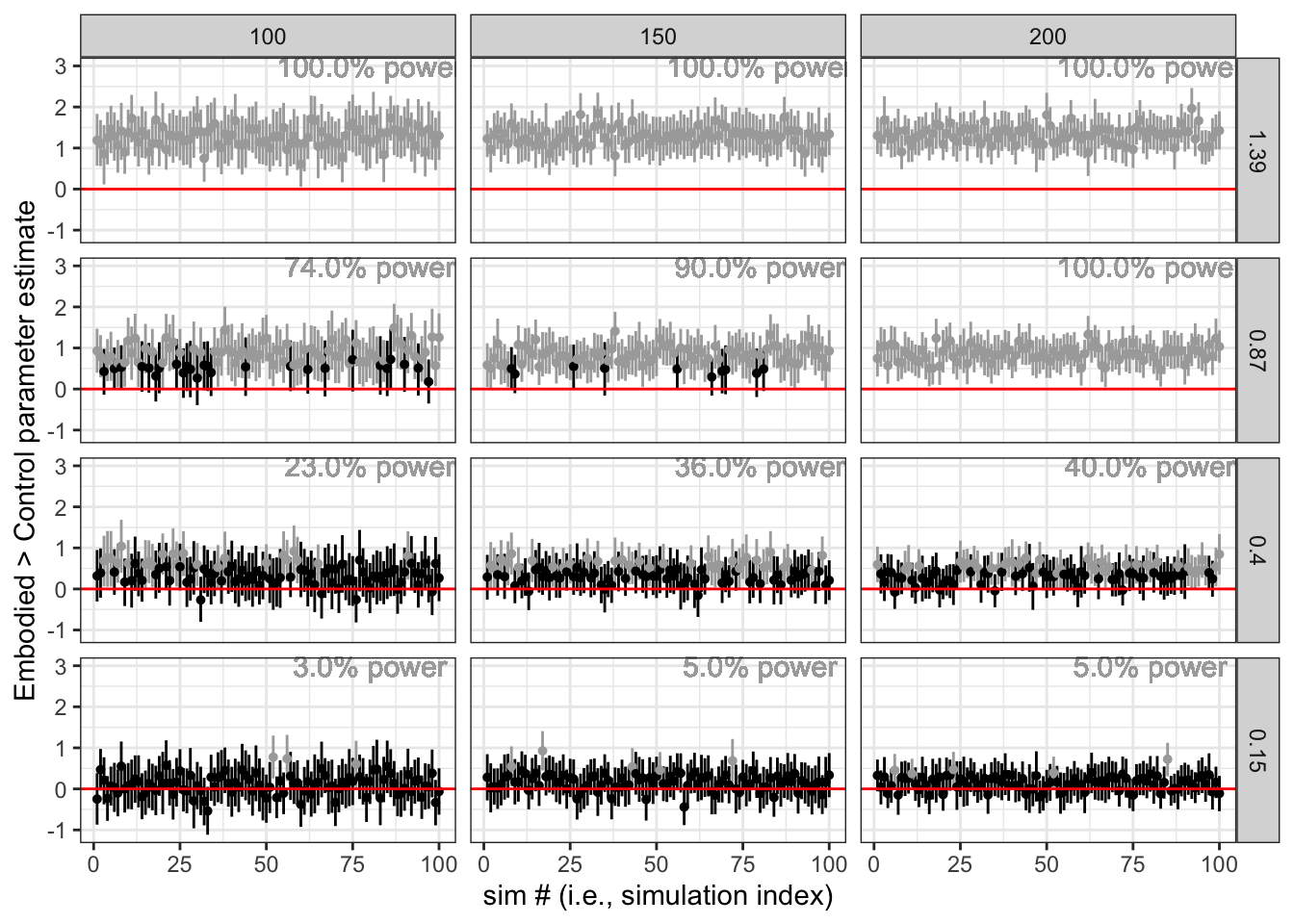
## 7.2 calculate power i.e., % Q2.5 > 0
```{r}
#| label: calc-power
power <- p_100 |>
  filter(parameter == "groupembodied") |>
  mutate(check = if_else(Q2.5 > 0, 1, 0)) |>
  summarise(power = mean(check), .by = c(subj_n, b1)) |>
  mutate(subj_n = factor(subj_n), b1 = factor(b1)) # this helps to plot and join later.
power
```
plot power
```{r}
#| label: plot-power
p_power <- ggplot(power, aes(x = b1, y = subj_n, fill = power)) +
  geom_tile() +
  geom_text(aes(label = sprintf("%.3f", power)), color = "white", size = 10) +
  scale_fill_viridis_c(limits = c(0, 1))
p_power
#ggsave("figures/power.png", width = 8, height = 6)
```
plot parameters and include power as a text label
wrangle
```{r}
#| label: calc-params-per-sim
plot_params <- p_100 |>
  filter(parameter == "groupembodied") |>
  mutate(
    below_zero = if_else(Q2.5 < 0, "yes", "no"),
    below_zero = factor(below_zero, levels = c("no", "yes")),
    subj_n = factor(subj_n),
    b1 = factor(b1),
  ) |>
  inner_join(power, by = c("subj_n", "b1")) |>
  mutate(power = round(power * 100, 2))
head(plot_params)
```
plot
```{r}
#| label: plot-params-per-sim
p_params <- plot_params |>
  ggplot(aes(x = rep, y = Estimate, ymin = Q2.5, ymax = Q97.5)) +
  geom_pointrange(size = 0.1, aes(colour = below_zero)) +
  geom_hline(yintercept = 0, colour = "red") +
  #geom_hline(aes(yintercept = as.numeric(b1)), colour = "blue") + # this would add a line at b1 - the target effect size
  scale_colour_manual(values = c("darkgrey", "black")) +
  geom_text(
    aes(x = 80, y = 3, label = sprintf("%.1f%s", power, "% power")),
    color = "darkgrey",
    size = 4
  ) +
  theme_bw() +
  theme(legend.position = "none") +
  labs(
    x = "sim # (i.e., simulation index)",
    y = "Embodied > Control parameter estimate"
  ) +
  facet_grid(fct_rev(b1) ~ subj_n)
p_params
#ggsave("figures/parameters.png", width = 10, height = 7)
```
## 7.3 let's now consider widths and precision, rather than NHST and power
```{r}
#| label: plot-lower-q
## read in if previously computed
p_100 <- read_csv(
  "data/p_100_sims.csv",
  show_col_types = FALSE
)
# head(p_100)

## wrangle to order by Q2.5
lower_q <- p_100 |>
  filter(parameter == "groupembodied") |>
  arrange(b1, subj_n, Q2.5) |>
  mutate(rank = 1:n(), .by = c(b1, subj_n)) |>
  mutate(
    subj_n = factor(subj_n),
    b1 = factor(b1)
  )
head(lower_q)
# glimpse(lower_q)

## plot
p_lower_q <- lower_q |>
  ggplot(aes(x = rank, y = Estimate, ymin = Q2.5, ymax = Q97.5)) +
  geom_pointrange(size = 0.1) +
  geom_hline(aes(yintercept = 0), colour = "red") +
  theme_bw() +
  theme(legend.position = "none") +
  scale_x_discrete(
    "reordered by the lower level of the 95% intervals",
    breaks = NULL
  ) +
  labs(
    y = "Embodied > Control parameter estimate"
  ) +
  facet_grid(fct_rev(b1) ~ subj_n)
p_lower_q
#ggsave("figures/params_by_Q2.5.png", width = 10, height = 7)
```
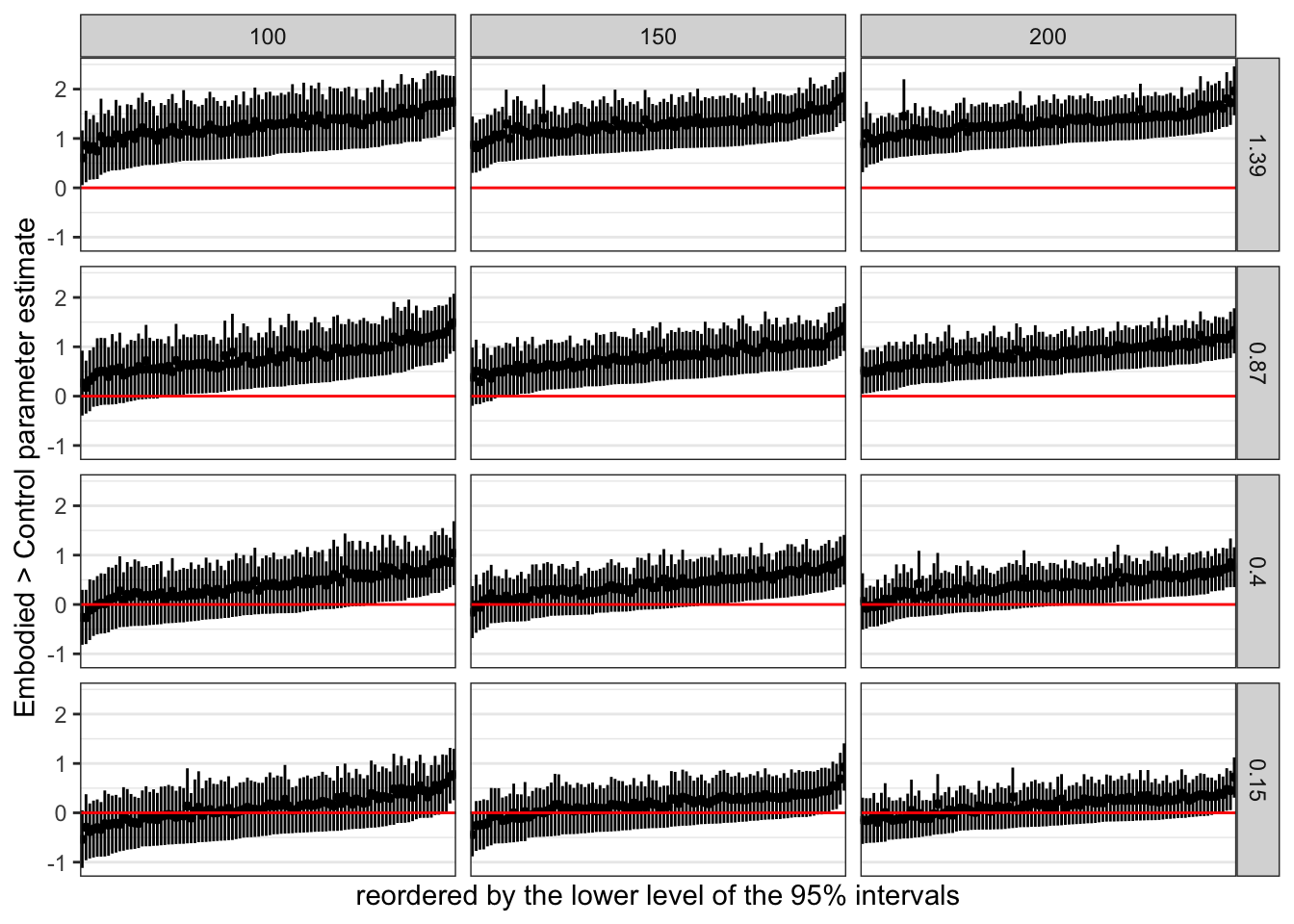
This arrangement highlights the differences in widths among the intervals.
The wider the interval, the less precise the estimate.
Some intervals were wider than others, but all tended to hover in a similar range.
We might quantify those ranges by computing a width variable.
```{r}
#| label: calc-q-width
lower_q <- lower_q |>
  mutate(width = Q97.5 - Q2.5)
head(lower_q)
```
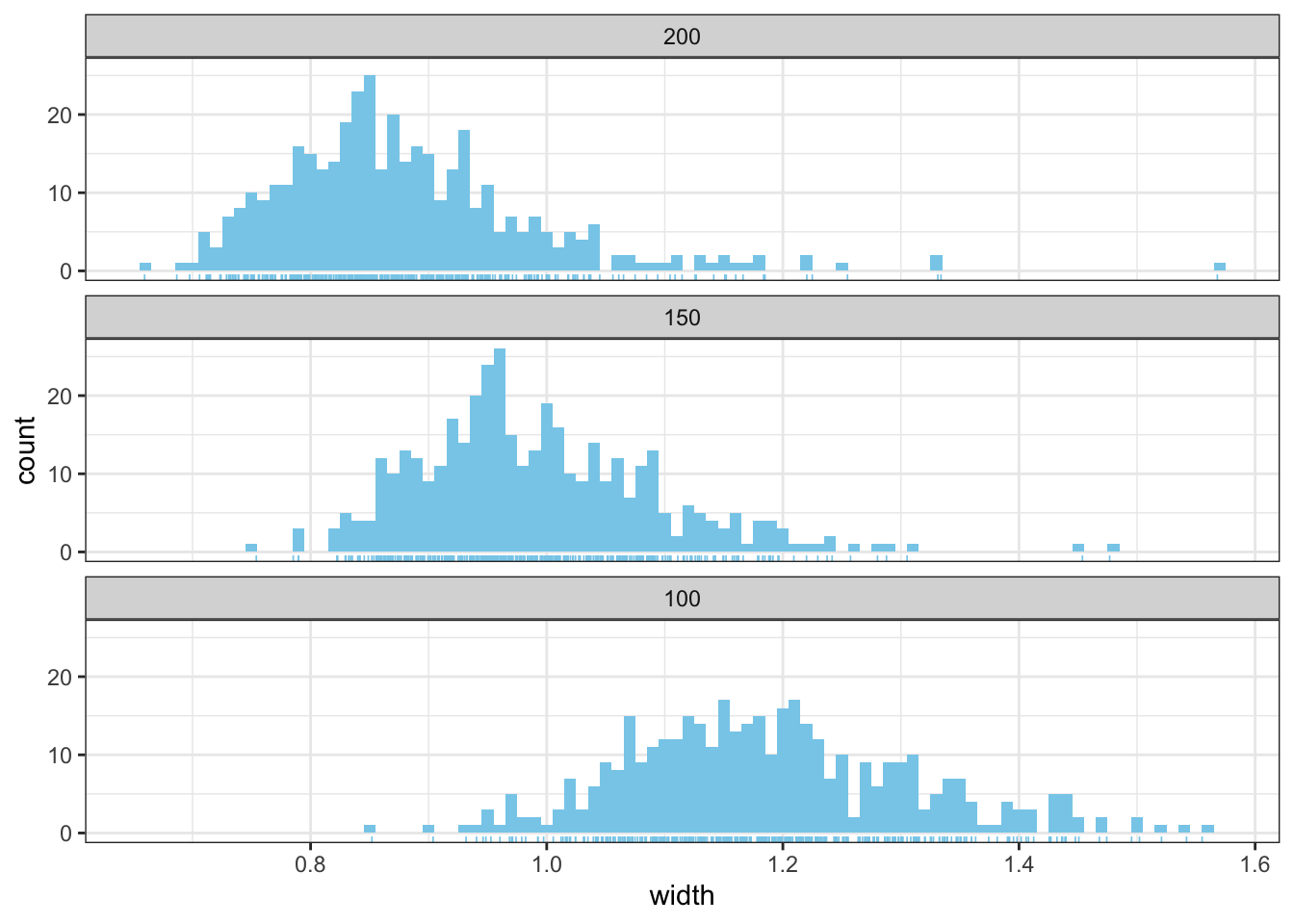
Here’s the width distribution.
```{r}
#| label: plot-width-hist
p_hist <- lower_q |>
  ggplot(aes(x = width, )) +
  geom_histogram(binwidth = .01, fill = "skyblue") +
  geom_rug(linewidth = 0.3, colour = "skyblue") +
  theme_bw() +
  theme(legend.position = "none") +
  facet_wrap(~ fct_rev(subj_n), ncol = 1)
p_hist
#ggsave("figures/width_hist.jpeg", width = 8, height = 6)
```
Instead of focusing on rejecting a null hypothesis, we might instead use our simulation skills to determine the sample size we need to have most of our 95% intervals come in at a certain level of precision.
This has been termed the accuracy in parameter estimation [AIPE; Maxwell et al.(2008); see also Kruschke (2015)] approach to sample size planning.
Thinking in terms of AIPE, in terms of precision, let’s say we wanted widths of 1.2, 1.0, 0.8 or smaller.
These are just arbitrary values based on the output of the sims so far.
For instance, there is no inherent meaning to these widths outside of the research context and typical precision that is expected.
Here’s how we did with our sims.
```{r}
#| label: calc-precision
#| code-fold: false
precision <- lower_q |>
  mutate(
    below_12 = if_else(width < 1.2, 1, 0),
    below_10 = if_else(width < 1.0, 1, 0),
    below_08 = if_else(width < 0.8, 1, 0)
  ) |>
  summarise(
    power_12 = mean(below_12),
    power_10 = mean(below_10),
    power_08 = mean(below_08),
    .by = c(b1, subj_n)
  )
precision
#write_csv(precision, "data/precision.csv")
```
ok, at N=150 per group (or higher), widths < 1.2 look good. 1.0 and .8 look much worse.
This simulation suggests we have a high probability of achieving 95% CI widths of 1.2 or smaller with n=150 or higher.
```{r}
#| label: plot-avg-width
#| code-fold: false
avg_width <- lower_q |>
  summarise(avg_width = mean(width), .by = c(b1, subj_n))
avg_width
#write_csv(avg_width, "data/avg_width.csv")
```
ok, so the average for N=150 is between is around 1 on average.
That would mean that an effect of 0.5 could be distinguished consistently from zero.
But of course, this would need some thinking about more generally.