# Data processing {#sec-data-processing}
This chapter uses [`tidyverse`](https://tidyverse.org/) tools to wrangle the data to re-shape it, plot it, create summary data and get it ready for modelling.
The basic structure here is as follows:
1. Read in wide format data.
2. Wrangle to re-shape it into long format.
3. Filter and create factors.
4. Run some data checks.
4. Plot the data.
5. Save our the data ready for modelling.
```{r}
#| label: setup
#| include: false
## load packages
pkgs <- c(
"tidyverse",
"patchwork",
"ggdist"
)
vapply(
pkgs,
library,
logical(1),
character.only = TRUE,
logical.return = TRUE
)
# Set theme for all plots
theme_set(
theme_bw() +
theme(
text = element_text(size = 18, face = "bold"),
title = element_text(size = 18, face = "bold"),
legend.position = "bottom"
)
)
```
# 1. Read in the data
```{r}
#| label: read-wide-data
#| code-fold: false
dat_wide <- read_csv(
  "data/sim_dat_wide.csv",
  show_col_types = FALSE
)

head(dat_wide)
# glimpse(dat_wide)
# summary(dat_wide)
```
# 2. Reshape from wide to long
```{r}
#| label: create-long-data
#| code-fold: false
dat_long <- dat_wide |>
  pivot_longer(
    cols = starts_with("item_"),
    names_to = "item_id",
    names_prefix = "item_",
    values_to = "correct"
  ) |>
  mutate(item_id = as.numeric(item_id)) |>
  relocate(item_id, .after = "pid")

head(dat_long)
# glimpse(dat_long)
# summary(dat_long)
```
# 3. Filter and create factors for plotting
```{r}
#| label: create-factors
#| code-fold: false
dat <- dat_long |>
  filter(test_time == "delay") |>
  select(-test_time) |>
  mutate(
    group = factor(
      group,
      levels = c("control", "embodied")
    )
  )

head(dat)
```
# 4. Run some data checks
At this point, it would be worth running some checks on the data.
This will almost always involve data visualisation at the same time.
Basic checks might be:
- how many pids and trials per group?
- Are there any implausible values? e.g., values outside of a sensible range, given the measure?
- Any missing data?
- Ceiling or floor effects per pid or item?
- What do the data distributions look like? Density/Histrograms would be useful.
- Have exclusion criteria been applied accurately and as per the pre-registration (if one exists)?
There will also be a bunch of other very sensible things that you should check and plot.
And this is the engine room of data analysis, so seeking advice on good data hygiene and principles for data cleaning would be a good idea.
# 5. Plot the data
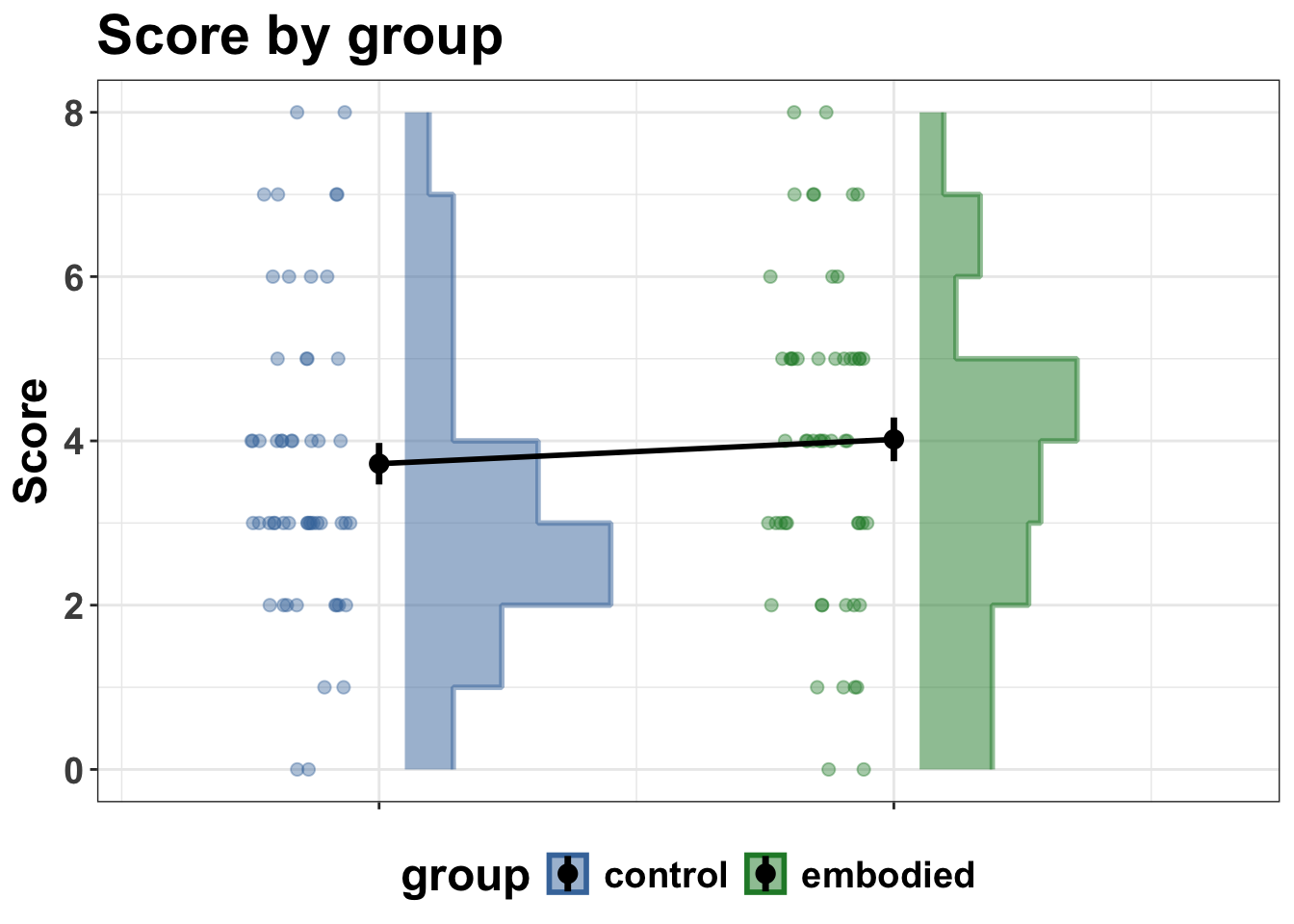
And now summarise and plot
```{r}
#| label: summarise-data
#| code-fold: false
dat_summary <- dat |>
  filter(!is.na(correct)) |>
  summarise(
    score = sum(correct),
    n_items = n(),
    .by = c(pid, group)
  ) |>
  arrange(pid, group)

head(dat_summary)
```
```{r}
#| label: create-plots
#| code-fold: false
group_colours <- c(control = "#4477AA", embodied = "#228833")

p1 <- dat_summary |>
  ggplot(aes(y = score, fill = group, colour = group)) +
  # histogram slab nudged right
  stat_slab(
    aes(x = as.numeric(group) + 0.05, thickness = after_stat(pdf)),
    side = "right",
    scale = 0.4,
    alpha = 0.5,
    density = "histogram",
    breaks = breaks_fixed(width = 1)
  ) +
  # dots nudged left with jitter
  geom_point(
    aes(x = as.numeric(group) - 0.15),
    position = position_jitter(width = 0.1, height = 0),
    alpha = 0.4,
    size = 2
  ) +
  # mean + SE at centre
  stat_summary(
    aes(x = as.numeric(group)),
    fun.data = mean_se,
    geom = "pointrange",
    colour = "black",
    size = 0.6,
    linewidth = 1.2
  ) +
  stat_summary(
    aes(x = as.numeric(group), group = 1),
    fun = mean,
    geom = "line",
    linewidth = 1,
    colour = "black"
  ) +
  scale_x_continuous(
    breaks = 1:2,
    labels = c("control", "embodied"),
    expand = expansion(add = c(0.3, -0.3)) # more space left, less right
  ) +
  scale_fill_manual(values = group_colours, name = "group") +
  scale_colour_manual(values = group_colours, name = "group") +
  labs(
    title = "Score by group",
    x = NULL,
    y = "Score"
  ) +
  theme(
    axis.text.x = element_blank()
  )

print(p1)
```
# 6. Save out the data for modelling
```{r}
#| label: save-data
#| code-fold: false
write_csv(dat, "data/dat.csv")
```