| Verb | Purpose | Example |
|---|---|---|
| `filter()` | Keep rows matching a condition | `filter(rt > 200)` |
| `select()` | Keep or drop columns by name | `select(id, condition, rt)` |
| `mutate()` | Create or transform columns | `mutate(log_rt = log(rt))` |
| `summarise()` | Collapse rows to summary statistics | `summarise(mean_rt = mean(rt))` |
| `arrange()` | Sort rows by one or more columns | `arrange(desc(rt))` |
| `group_by()` | Define groups for subsequent operations | `group_by(participant, condition)` |
| `rename()` | Rename columns | `rename(response_time = rt)` |
| `distinct()` | Keep unique rows | `distinct(participant)` |
| `count()` | Count observations by group | `count(condition)` |
| `left_join()` | Join two data frames by a key column | `left_join(data, demo, by = 'id')` |
Data Processing
Tiptl;dr
Learn to love tidy data and the tidyverse (Wickham et al., 2023)
Data processing, which typically involves re-shaping and cleaning data, is where most of the actual work happens and where methods sections can fall somewhat silent. A typical paper will describe the design in detail and the statistical model at length, and then dispose of everything in between with a far briefer set of notes and rest on allusions to “standard preprocessing.” This is where decisions that can affect the results are made. And it is therefore fundamental that these steps are made explicit via code and easy to reproduce.
Here I do not focus on specific decisions, such as setting exclusion criteria. Instead, I want to focus on the more general aspects of our chosen workflow.
A reproducible analysis pipeline
Analysis code should be a record of decisions, not just the instructions for a computer. Quarto documents, therefore, by mixing code and prose, can be a useful ally by serving as a processing notebook.
The raw-to-processed pipeline should be fully reproducible from a script. This means that you, or anyone else in theory, could reproduce the analysis steps at any point in time. And it means that any changes to analysis decisions can be easily made with the consequent changes to data and figures easily implemented.
The “tidy” data format
Tidy data is long format data rather than wide format data. This means one observation is recorded per row of a data structure. We find this helpful for many reasons:
- It makes data visualisation easy and natural in ggplot2 see Data Visualisation.
- The structure is suitable for fitting multi-level regression models, which is our default approach to inferential modelling.
- Team members (and anyone else) can expect and understand a certain data format, which aids collaboration, peer-review and ease of re-use.
- If another format is required, we like the idea that one default version is in the tidy, long format.
- Summary data can easily be calculated in variety of forms.
The ease of “dplyr” commands
My feelings about using R + Tidyverse tools for data science is nicely summarised in this post by Amol Borkar.
More specifically, I like using dplyr verbs for at least four reasons.
- The syntax is easy to understand and relies on a small set of verbs.
- They can be piped into a chain and easily commented.
- They are designed to naturally integrate with data visualisation via ggplot2.
- They fit nicely into a functional programming approach, which makes it easy to write compact loops.
In the following subsections, I outline each of these benefits in a little more detail.
(1) Syntax for common dplyr verbs
(2) Piping verbs together
The real power of dplyr is chaining verbs with the pipe operator (|>). Each step reads as a plain-English instruction, and comments make the intent explicit.
library(tidyverse)
library(palmerpenguins)

# Start with the penguins dataset
penguins |>
  # Remove rows with missing values in key columns
  filter(!is.na(bill_length_mm), !is.na(body_mass_g)) |>
  # Keep only the columns we need
  select(species, island, bill_length_mm, body_mass_g, sex) |>
  # Create a new column: body mass in kg
  mutate(body_mass_kg = body_mass_g / 1000) |>
  # Group by species and sex
  group_by(species, sex) |>
  # Summarise to get mean bill length and body mass per group
  summarise(
    n = n(),
    mean_bill = mean(bill_length_mm),
    mean_mass = mean(body_mass_kg),
    .groups = "drop"
  ) |>
  # Sort by mean bill length, descending
  arrange(desc(mean_bill))
# A tibble: 8 × 5
species sex n mean_bill mean_mass
<fct> <fct> <int> <dbl> <dbl>
1 Chinstrap male 34 51.1 3.94
2 Gentoo male 61 49.5 5.48
3 Chinstrap female 34 46.6 3.53
4 Gentoo <NA> 4 45.6 4.59
5 Gentoo female 58 45.6 4.68
6 Adelie male 73 40.4 4.04
7 Adelie <NA> 5 37.8 3.54
8 Adelie female 73 37.3 3.37The pipeline above is a readable record of every data transformation decision. Each step is independently understandable, and the comments make it easy to return to six months later.
(3) Seamless integration with ggplot2
Because dplyr and ggplot2 share the same data grammar, a pipeline can flow directly into a plot.
# Start with the penguins dataset
penguins |>
  # Remove rows where sex is missing
  filter(!is.na(sex)) |>
  # Map species to x-axis, bill length to y-axis, colour by sex
  ggplot(aes(x = species, y = bill_length_mm, colour = sex)) +
  # Plot individual observations, jittered slightly to reduce overplotting
  geom_jitter(width = 0.05, alpha = 0.4, size = 1.5) +
  # Human-readable axis and legend labels
  labs(
    title = "Penguin bill length by sex and species",
    x = "Species",
    y = "Bill length (mm)",
    colour = "Sex"
  ) +
  # Clean minimal theme with base font size 13
  theme_minimal(base_size = 13)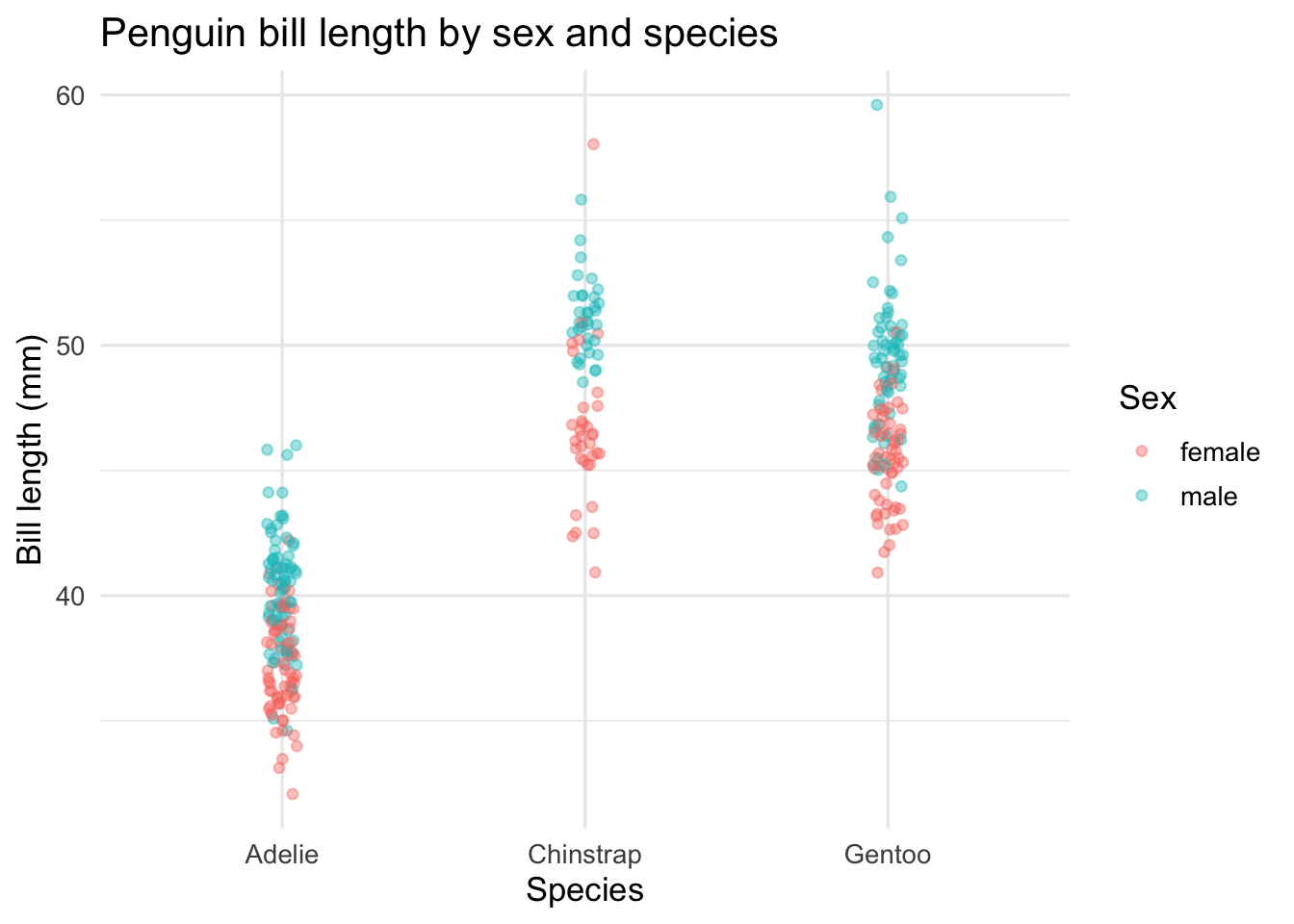
The pipeline from raw data to final figure is a single unbroken chain. The wrangling and the visualisation are in one place, which means the figure is always reproducible from the data without any intermediate steps that could be lost or forgotten.
(4) Functional programming
Functional programming is a compact way to avoid writing step-by-step loops. For more information, see this talk by Hadley Wickham and this vignette of the tidyverse purrr package. We find it helpful to think about data wrangling in this way, and we suspect it reduces the number of bugs in our code.