# Data Visualisation {#sec-data-visualisation}
::: {.callout-tip}
## tl;dr
Make your data sing with [ggplot2](https://ggplot2.tidyverse.org/) [@nordmannDataVisualizationUsing2022; @healyDataVisualizationPractical2019].
:::
Visualisation is not a final step.
It is a practice that runs through the entire research workflow from data simulation, to the first look at raw data to the figures in a paper.
Treating it as decoration, something to be polished once the analysis is done, misses most of its value.
We actually do not find the process of data visualisation to be particularly intuitive or easy, and we are always trying to find better ways to plot aspects of our data and models.
Fortunately, help is at hand, as there are several excellent resources that have helped develop our thinking and that warrant a close read in our view [@healyDataVisualizationPractical2019; @nordmannDataVisualizationUsing2022; @gabryVisualizationBayesianWorkflow2019; @kayGgdistVisualizationsDistributions2024].
## Guiding principles
- Visualisation is an essential part of data analysis, rather than a decoration.
- We of course use it to understand our data and to communicate with others easily.
- But we also use it in an iterative manner as a code check on data processing steps.
For example, when adding a new wrangling step we would typically plot-wrangle-plot, to see that the process worked as intended.
- Likewise, with model objects, there are many different ways that visualisation can make complex processes easier to understand by adding checks and balances throughout [@gabryVisualizationBayesianWorkflow2019].
- We try to show as much of the raw data as possible, and not just the summary data.
This is because plots reveal what you don't see in a table of summary statistics, as nicely illustrated by [Anscombe's quartet](https://en.wikipedia.org/wiki/Anscombe%27s_quartet) and the [datasaurus dozen](https://en.wikipedia.org/wiki/Datasaurus_dozen).
- Uncertainty should be made visible via interval estimates and visualisations of posterior distributions.
- Avoid bar charts for continuous data — raincloud plots, violin plots, dot plots are preferred.
- Use a consistent style or theme across a project.
- Request pre-publication peer-review of figures.
Given the vast range of options in terms of aesthetics and layouts, we seek pre-publication feedback on our plots as we work through the analytical process.
## Our current stack
- [ggplot2](https://ggplot2.tidyverse.org/) as the foundation.
- [ggdist](https://mjskay.github.io/ggdist/) for distributional plots and posterior visualisation of model objects.
- [patchwork](https://patchwork.data-imaginist.com/) for multi-panel figures.
## Some examples
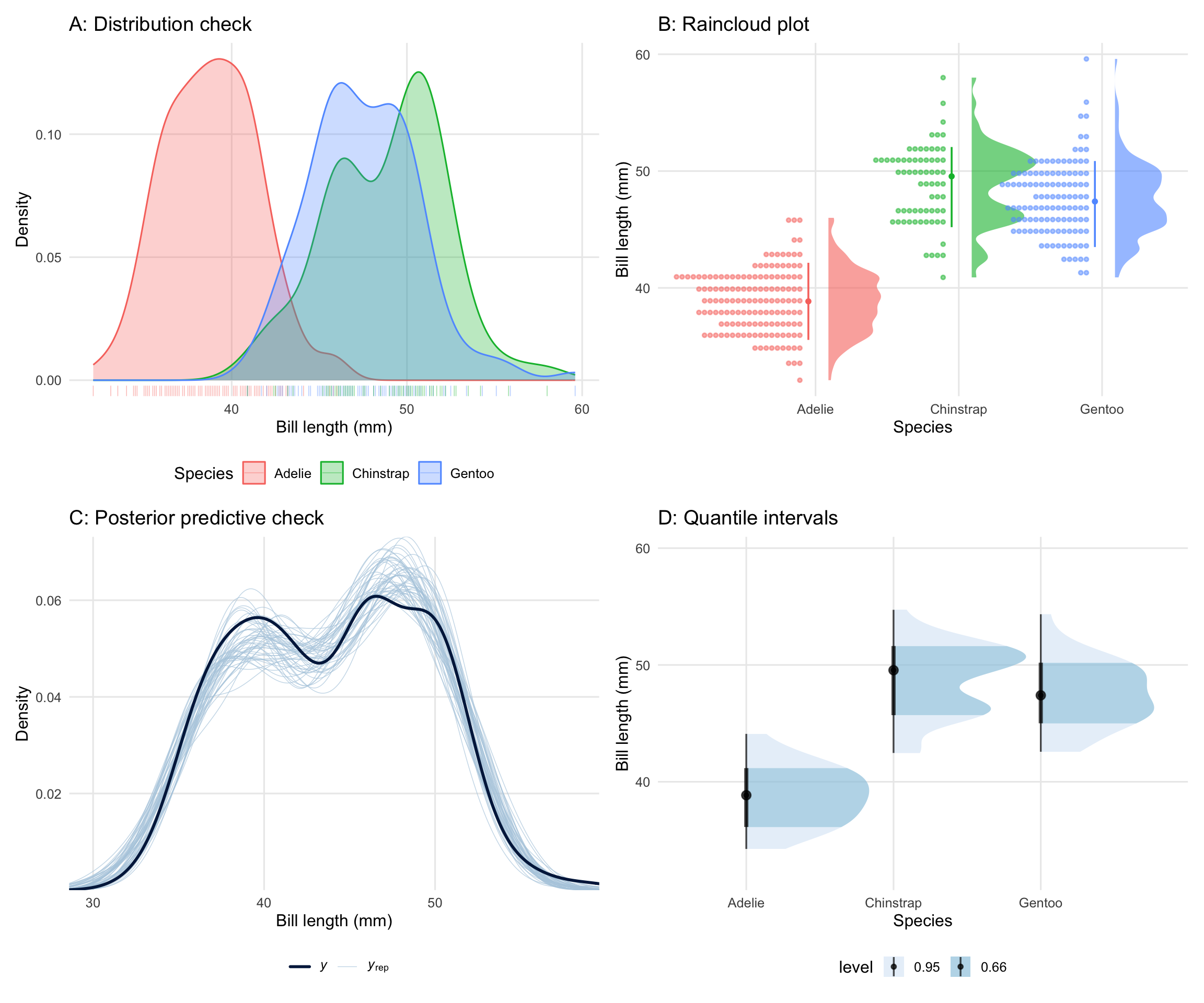
The four plots below illustrate the guiding principles described above, using the `palmerpenguins` dataset throughout.
They are assembled into a single figure using `patchwork`.
We first get some data and fit a model in brms.
```{r}
#| label: setup-dataviz
#| code-fold: true
#| message: false
#| warning: false
library(tidyverse)
library(palmerpenguins)
library(ggdist)
library(patchwork)
library(brms)
library(RColorBrewer)

# Remove rows with missing values in key columns
penguins_clean <- penguins |>
  filter(!is.na(bill_length_mm), !is.na(sex), !is.na(species))

# Create models directory if it doesn't exist
if (!dir.exists("models")) {
  dir.create("models")
}

# Fit once and save; load thereafter
if (!file.exists("models/m_penguins.rds")) {
  m_penguins <- brm(
    formula = bill_length_mm ~ species + sex,
    data = penguins_clean,
    family = gaussian(),
    chains = 4,
    cores = 4,
    iter = 2000,
    warmup = 1000,
    seed = 123,
    silent = 2
  )
  saveRDS(m_penguins, "models/m_penguins.rds")
} else {
  m_penguins <- readRDS("models/m_penguins.rds")
}
```
And then we show some plots.
The top row is raw data.
The bottom row is from the fitted model object.
```{r}
#| label: fig-dataviz-examples
#| fig-cap: "Four visualisation approaches illustrated using the Palmer Penguins dataset. (A) Distribution check: density plots with a rug for spotting outliers after wrangling. (B) Raincloud plot: raw data, distribution, and summary in one panel. (C) Posterior predictive check: observed data density (dark) overlaid with draws from the posterior predictive distribution (light), as a model fit check. (D) Quantile intervals: median with 66%, and 95% intervals to show uncertainty."
#| fig-width: 12
#| fig-height: 10
#| message: false
#| warning: false
#| code-fold: true
# A shared minimal theme for consistency across all four panels
theme_book <- function() {
  theme_minimal(base_size = 12) +
    theme(
      legend.position = "bottom",
      panel.grid.minor = element_blank()
    )
}

# --- Plot A: Distribution check ---
# A quick density plot per species to check data after wrangling.
# The rug layer shows individual observations and makes outliers obvious.
p_a <- penguins_clean |>
  ggplot(aes(x = bill_length_mm, fill = species, colour = species)) +
  # Density per species
  geom_density(alpha = 0.3) +
  # Rug of individual observations along the x-axis
  geom_rug(alpha = 0.4, linewidth = 0.3) +
  labs(
    title = "A: Distribution check",
    x = "Bill length (mm)",
    y = "Density",
    fill = "Species",
    colour = "Species"
  ) +
  theme_book()

# --- Plot B: Raincloud plot ---
# Raw dots + half-violin + pointrange summary.
# Shows the full distribution and individual observations simultaneously.
p_b <- penguins_clean |>
  ggplot(aes(
    x = species,
    y = bill_length_mm,
    fill = species,
    colour = species
  )) +
  # Half-violin (the "cloud")
  stat_halfeye(
    adjust = 0.5,
    width = 0.5,
    justification = -0.2,
    .width = 0,
    point_colour = NA,
    alpha = 0.6
  ) +
  # Raw data dots (the "rain")
  geom_dots(
    side = "left",
    dotsize = 0.5,
    justification = 1.1,
    alpha = 0.5
  ) +
  # Median and 80% interval
  stat_pointinterval(
    .width = 0.80,
    linewidth = 1.2,
    position = position_nudge(x = -0.05)
  ) +
  labs(
    title = "B: Raincloud plot",
    x = "Species",
    y = "Bill length (mm)"
  ) +
  theme_book() +
  theme(legend.position = "none")

# --- Plot C: Posterior predictive check ---
# Observed data density (dark line) overlaid with draws from the posterior
# predictive distribution (light lines). A good model should produce
# predictive draws that closely match the observed data.
p_c <- pp_check(
  m_penguins,
  ndraws = 50, # number of posterior predictive draws to overlay
  type = "dens_overlay"
) +
  labs(
    title = "C: Posterior predictive check",
    x = "Bill length (mm)",
    y = "Density"
  ) +
  theme_book()

# --- Plot D: Quantile intervals ---
# Median with nested 50%, 80%, and 95% intervals per species and sex.
# A clean way to communicate uncertainty without a full distribution.
p_d <- penguins_clean |>
  ggplot(aes(x = species, y = bill_length_mm)) +
  # Quantile intervals at three levels
  stat_halfeye(
    aes(fill = after_stat(level)),
    .width = c(0.66, 0.95),
    position = position_dodge(0.4),
    colour = "black",
    #fill = after_stat(level),
    alpha = 0.7
  ) +
  scale_fill_brewer(na.translate = FALSE) +
  labs(
    title = "D: Quantile intervals",
    x = "Species",
    y = "Bill length (mm)",
    colour = "Sex"
  ) +
  theme_book()

# --- Assemble with patchwork ---
(p_a + p_b) / (p_c + p_d)
```